


A General
Warnings:
This documentation may contain spelling, grammatical, didactic or functional errors. We therefore apologize in advance and ask if possible to notify significant errors on the WDB site in github
A. 1 - About WDB
WDB is an ORM for PHP (object-relational mapping). This means that it allows to manipulate a database according to an object-oriented approach, greatly simplifying the programmer's task, while providing a significant time saving in coding and subsequent maintenance. The use of pure and hard SQL cannot be compared to elegance of using an ORM. WDB makes your code more readable, and therefore easily maintainable. With its simplicity even a person who does not know much to SQL could get away with it without much problem. But that's not all.
Since database management systems do not always speak the same language in all circumstances, WDB, like many other ORMs, allows you to handle several types of databases without worrying about the specificities to each one, nor questions related to SQL injection issues. For this, WDB uses PDO the famous PHP class dedicated to the manipulation of databases.
WDB is released under the MIT license, which allows you as a person or company to use it freely and without any limits.
A. 2 - The limitations of WDB
That said, WDB has no pretensions. It is neither the first nor the last ORM for PHP. There are online of all categories of ORMs, some really beautiful and very stable. We tried to give WDB the greatest possible stability for a first version, knowing anyway that there is still a lot to do, whether on the point of stability or features. So using WDB one should be aware of this:
- This is a first version. Despite all the good work that has been done, there could be bugs.
- Some features have not been tested on some DBMS, or have only been tested summarily.
- WDB does not yet offer an object-oriented interface that allows you to simply manipulate the schema. To do this you can still use WDB, but juggling with your own SQL.
 However, we strongly believe and hope that using WDB will leave you with a pleasant impression!
A. 3 - Prerequisites
- PHP 5.3 or newer.
- PDO must be installed.
- A supported database must be installed.
- The database access credentials (obviously!).
- Your database PDO driver must be enabled.
A. 4 - Supported DBMS and associated drivers
WDB supports the following database types and their associated drivers. If necessary, click on the name of a driver to go to the corresponding PDO documentation.
- Database
- MySQL, Maria DB pdo_mysql
- SQLite pdo_sqlite
- PostGreSQL pdo_pgsql
- MSSQL (Windows) pdo_sqlsrv
- MSSQL (Linux)
pdo_sqlsrv pdo_dblib - Sybase pdo_dblib
- Oracle pdo_oci
- Cubrid pdo_cubrid
- Firebird pdo_firebird
- Informix pdo_informix
- DB2 pdo_ibm
A. 5 - Installation
A . 5 . 1 - First stape
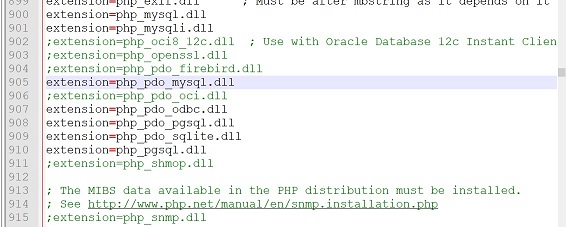
As said before, you need to make sure that the PDO driver of your database type is enabled in the php.ini file. This will usually be the case for the SQlite driver if you are using a recent version of PHP. If you are using MYSQL, its PDO driver is often enabled in most hostings. But if you are not sure, you can list with the PHP function PDO::getAvailableDrivers() all the PDO extensions that are installed.
If it turns out that your driver is not enabled, you can do it yourself if you have access to the php.ini file. To do this, you would just have to open this file in a text editor (not an office editor like Word, nor WordPad, nor OpenOffice, but rather Notepad or Gedit) and remove the semicolon (;) in front of the name of the driver corresponding to your database and save the file.
A . 5 . 2 - Installing with Composer
Depending on your OS, run one of the following commands:composer require ncb/wdb
php composer.phar require ncb/wdb
You then just have to include the vendor/autoload.php file in your PHP script and you're done.
require "vendor/autoload.php";
/* In the following, the connection to the DB */
 ...
A . 5 . 3 - Direct inclusion
If you want to include WDB directly in your script, download WDB if you haven't done so yet, unzip it and place the wdb directory in the desired location of your website. Then include one of the following two files in your script: src/WDB.php or vendor/autoload.php. Pay attention to the file name , which is WDB.php and not wdb.php
require "path_to_wdb-folder/src/WDB.php";
/* In the following, the connection to the DB */
 ...
BConnexion
First of all, note that the WDB class and all the underlying classes are defined in the \NCB01\WDB namespace.
To work with WDB, it is necessary to create an instance of the class. This can be done in one of the following 3 ways:
/* using an array of parameters. */
$db = new \ncb01\wdb\wdb($settings);
/* using a PDO object */
$db = new \ncb01\wdb\wdb($pdo, $dbtype [, $options]);
/* using a DSN */
$db = new \ncb01\wdb\wdb($dsn, $user, $password, $dbtype [, $options]);
This type of call with namespace is a bit long and cumbersome. To keep it simple, we assume now and in the sequel, that we have included WDB in our script in one of two ways::
require "path_to_wdb-folder/src/WDB.php";
use NCB01\WDB\WDB;
require "path_to_wdb-folder/vendor/autoload.php";
use NCB01\WDB\WDB;
With the second statement ( use NCB01\WDB\WDB ), we ask PHP to be able to use the WDB class by omitting the namespace. In this way, the three methods to obtain an instance of WDB become:
/* using an array of parameters */
$db = new wdb($settings);
/* using a PDO object */
$db = new wdb($pdo, $dbtype [, $options]);
/* using a DSN */
$db = new wdb($dsn, $user, $password, $dbtype [, $options]);
B . 1 - Connecting with a PDO object
Dans ce cas-ci, l'instanciation de l'objet wdb suit le schéma suivant:
$db = new wdb($pdo, $dbtype [, $options]);
$pdo is a PDO object that you created, $dbtype (see later) is a constant representing the type of DB you are using, and $options is an array of options (see also later). For example, a connection to MYSQL might look like this:
# you create a PDO instance somewhere ...
$pdo = new PDO(...);

#  ... And you use this object to create WDB.
#  WDB::MYSQL is the constant to identify MYSQL and Maria DB
$db = new wdb($pdo, wdb::MYSQL);
Example of use with SQLite:
# We create a PDO object somewhere.
$pdo = new PD("sqlite::memory:");

/*  We instantiate WDB with our PDO object. */
$db = new WDB($pdo, wdb::SQLITE);
Please note that instantiating WDB with a PDO object could affect the value of the attribute PDO::ATTR_ERRMODE of the PDO object. It is strongly recommended not to handle the same pdo object at the same time as WDB. If you still want to do it, do it best when you're done using WDB. And in this case, you should consider restoring the value of the PDO::ATTR_ERRMODE attribute of your PDO object.
B . 2 - Connecting with an array of parameters
We pass to the WDB constructor an Array of parameters:
B . 2 . 1 - Connecting to SQLite
/*  To connect to SQLite, specify the type of database
 *  as well as the full path of the DB file
 *
 *  Note: if the file path is omitted, the DB is created in memory.
 */
$db = new wdb(array(
  "type"    =>  wdb::SQLITE,
  "path"    =>  "path_to_db_file",  # optional,
  "options" =>  array(...),         # optional, to see further
));
B . 2 . 2 - Connecting to Firebird
$db = new wdb(array(
  "type"    =>  wdb::FIREBIRD,
  "user"    =>  "user_name",
  "pswd"    =>  "password",
  "path"    =>  "path_to_db_file",
  "charset" =>  "charset_name",   # optional
  "role"    =>  "SQL role_name",  # optional
  "dialect" =>  db_dialect,       # optional, will be 1 or 3 (default)
  "options" =>  array(...)        # optional, to see further
));
B . 2 . 3 - Connection to other DBMS
The general instantiation scheme for the WDB object is as follows:
$db = new wdb( $settings ) ;
$settings will be a PHP array containing the properties needed for the connection. Many of these properties are the same for all DBMS, such as: database name, Database server name, port (often optional), user name as well as user password. All these elements will therefore be in $settings, without forgetting the type of DBMS. However, given your needs and the type of your DBMS, other mandatory or non-mandatory elements may be added to those mentioned here. The keys used to identify this or that element are illustrated in the following example:
$db = new wdb(array(
  "server"  =>  "server_name",
  "port"    =>  "port_nummer", # optional
  "dbname"  =>  "db_name",
  "type"    =>  wdb::MYSQL,    # to see further
  "user"    =>  "user_name",
  "pswd"    =>  "passwort",
  "charset" =>  "charset",     # optional
  "options" =>  array(...),    # optional, to see further
));
Some of these keys can take several names. For example, we can use host or server as desired, just like password or pswd. The names in each of the following groups are interchangeable: (server, host) - (db, dbname, database) - (psw, pswd, password) - (file, path, dbpath, dbfile, filepath). This last group is used to designate the database file path for SQLite or Firebird
All these elements are only used to create the DSN internally. This means that apart from the elements mentioned here, any other element that may be involved in the creation of the DSN can appear in the array $settings
B . 2 . 3 . 1 - Connecting to SQL Server and Sybase
Connecting to SQL Server or to Sybase follows the general scheme, except for one detail. Only for connection to these two DBMS, the DSN prefix is required. The database type is wdb::SQLSERVER for SQL Server and wdb::SYBASE for Sybase. When using SQL Server with the pdo_sqlsrv driver the DSN prefix is sqlsrv: . When using the pdo_dblib driver the DSN prefix depends on the underlying libraries. it can be sybase: , mssql: or dblib:
/*  Connecting to SQL Server with pdo_sqlsrv.
 *
 *  Apart from the global data used by all drivers, pdo_sqlsrv allows
 *  extra parameters which can be added as needed. The list and description
 *  of these parameters can be found in the official driver documentation.
 */
$db = new wdb(array(
   "prefix"  =>  "sqlsrv:",        # the DSN prefix is mandatory
   "server"  =>  "server_name",
   "port"    =>  "port_number",    # optionall
   "dbname"  =>  "db_name",
   "type"    =>  wdb::SQLSERVER,   # constant designating SQL Server
   "user"    =>  "user_name",
   "pswd"    =>  "passwort",
   "options" =>  array(...),       # optional, to see further

   # This is not madatory. But if you want
   # You can add extra parameters, specific to SQL Server
   "LoginTimeout" =>  120,
   "TransactionIsolation" =>  PDO::SQLSRV_TXN_READ_UNCOMMITTED,
));
/*  Connecting to SQL Server with pdo_dblib
 *
 *  Connecting to Sybase would be identical, except for the prefix
 *  which would be "sybase:" and the type which would be wdb::SYBASE
 */
$db = new wdb(array(
	"prefix"  =>  "mssql:",       # the DSN prefix is mandatory
	"server"  =>  "server_name",
	"port"    =>  "port_number",  # optionall
	"dbname"  =>  "db_name",
	"type"    =>  wdb::SQLSERVER, # constant designating SQL Server
	"user"    =>  "user_name",
	"pswd"    =>  "passwort",
	'options' =>  array(...),     # optional, to see further
));
B . 2 . 3 - DBMS type constants
WDB defines a constant for each supported DB type. This is the constant to pass to the WDB constructor when we want to create an instance. In the following list the names of the databases are in blue, and the corresponding constants in pale red. Note that the constants are all uppercase and case sensitive!!!. Here is the full list:
- Maria DB , MySQL == wdb ::MYSQL
- SQLite == wdb ::SQLITE
- PostGreSQL == wdb ::POSTGRESQL
- Oracle == wdb ::ORACLE
- Sybase == wdb ::SYBASE
- SQL Server == wdb ::SQLSERVER
- Cubrid == wdb ::CUBRID
- Informix == wdb ::INFORMIX
- Firebird == wdb ::FIREBIRD
- DB2 == wdb ::DB2
 What if we use DBMS names instead of constants? No problem, WDB automatically
transforms these into their equivalent constant. Also, the names are case insensitive. This is not the case
for constants. However, we recommend using constants if possible, which are much faster. Here is an example
of the names that can be used for the different DBMSs:
What if we use DBMS names instead of constants? No problem, WDB automatically
transforms these into their equivalent constant. Also, the names are case insensitive. This is not the case
for constants. However, we recommend using constants if possible, which are much faster. Here is an example
of the names that can be used for the different DBMSs:
- DB2: db2
- Cubrid: cub, cubrid
- Firebird: frbd, fire, firebird
- Informix: ifmx, inf, informix
- MySQL, Maria DB: mys, mysql, mar, maria
- Oracle: ora, oracle
- PostGreSQL: pgsql, pos, postgresql
- SQL Server: sqls, sqlsrv, sqlserver, sql server
- SQLite: sqli, sqlite
- Sybase: syb, sybase
These names are just an illustration. In reality, WDB uses for detection the first 3 characters of the real name when there is no possible confusion, and 4-5 characters otherwise. There are obviously also (when the real name is very long) some shortened names to help with readability: frbd, ifmx, pgsql, sqlsrv .
Thus, using "sql" will cause an error, as it can correspond to sqlite or sql server
/*  The following two constructions therefore work identically. */
$db = new wdb(array(
	'type'   => wdb::SQLSERVER,
	'server' => 'localhost',
	'dbname' => 'myDB',
	'user'   => 'myUserName',
	'pswd'   => 'myPassword',
	'prefix' => 'sqlsrv:',
));

$db2 = new wdb(array(
	'type'   => 'SQL Server',
	'server' => 'localhost',
	'dbname' => 'myDB',
	'user'   => 'myUserName',
	'pswd'   => 'myPassword',
	'prefix' => 'sqlsrv:',
));
B . 3 - Connecting with a custom dsn
The signature of the constructor in this case is:
$db = new wdb($dsn, $user, $password, $dbtype [, $options]);
- $dsn : Your DSN, as a character string. Refer to your database's official documentation for the format to use. For SQLite for example, this string could be in one of the following forms: "sqlite3::path_to_dbfile" or "sqlite3::memory" etc.
- $user , $password : The DB user name and password. Both will be FALSE, NULL ou "" for SQLite.
- $dbtype : the type of the database, as mentioned earlier.
- $options : optional, must be an array if provided. This parameter is described in the following.
B . 4 - Connection options
They are optional and will be passed as key-value array. They can be very useful and allow you to configure certain aspects of the DB server and the current connection, such as enabling persistent connections, or how results are received, for example. Below is a list and brief description of the most common PDO options.
PDO::ATTR_PERSISTENT
TRUE : enables persistent connections FALSE : no persistent connections
TRUE : active les connexions persistantes
FALSE : désactive les connexions persistantes
PDO::ATTR_CASE
PDO::CASE_LOWER : forces column names to be lowercase.
PDO::CASE_NATURAL : leaves column names unchanged.
PDO::CASE_UPPER : forces column names to be uppercase.
PDO::ATTR_ORACLE_nuls
Conversion of NULL values and empty strings. Contrary to what the name might imply, the option is available for all drivers, not just Oracle.
PDO::NULL_NATURAL : No conversion.
PDO::NULL_EMPTY_STRING : Empty strings are converted to NULL.
PDO::NULL_TO_STRING : NULL is converted to an empty string.
PDO::ATTR_EMULATE_PREPARES
Enables or disables simulation of prepared queries. Some drivers do not natively support prepared queries or have limited support for them. This parameter forces PDO to emulate prepared queries (TRUE) or to use the native interface (FALSE). It will always attempt emulation if the driver does not have native support. A Boolean value is required. By default, WDB sets this option to TRUE. If this is not desired, this option must be explicitly set to FALSE.
TRUE : Simulation enabled FALSE : No simulation
PDO::ATTR_DEFAULT_FETCH_MODE
Sets the default method for receiving results. Can take different values among which PDO::FETCH_ASSOC , PDO::FETCH_BOTH , PDO::FETCH_LAZY and PDO::FETCH_OBJ . The different descriptions of the modes are available in the official PHP documentation of the method PDOStatement::fetch () . By default, WDB sets this option to PDO::FETCH_ASSOC . This means that the result rows are returned as a PHP array, the column names are the keys.
PDO::ATTR_STRINGIFY_FETCHES
Converts ( when TRUE ) numeric values to string when reading results. Takes a Boolean value TRUE or FALSE
PDO::ATTR_AUTOCOMMIT
Available on OCI, Firebird and MySQL - enables autocommit for each command. Takes a Boolean value TRUE or FALSE
PDO::MYSQL_ATTR_USE_BUFFERED_QUERY
Available on MySQL - enables the use of buffered queries. Takes a boolean value TRUE ou FALSE
PDO::ATTR_ERRMODE
Error reporting control. Tells WDB what to do when an error occurs.
PDO::ERRMODE_SILENT : simply assigns the error messages. No display.
PDO::ERRMODE_WARNING : just displays the error.
PDO::ERRMODE_EXCEPTION : throws an exception - WDB default value
/*  Example of connection under MySQL.
 *
 *  Let's enable persistent connections, emulate prepared
 *  queries simulation, and force column names to be uppercase.
 */
$db = new wdb(array(
   'type'   => wdb::MYSQL,
   'server' => 'localhost',
   'dbname' => 'myDB',
   'user'   => 'myUsername',
   'pswd'   => 'myPassword',
   'options'=>  array(
      PDO::ATTR_PERSISTENT  => TRUE,
      PDO::ATTR_EMULATE_PREPARES  => TRUE,
      PDO::ATTR_CASE  => PDO::CASE_UPPER
   )
));
C Data manipulation
It will be necessary, after reading this part, or perhaps even before, to take a look at the part explaining succinctly the use of conditions in WDB. It is also important to note that most non-static public methods in WDB return the WDB object, allowing actions to be chained. But on this last point we will talk about it later.
C. 1 - La sélection des données
In this part we will see in turn the following points:
- The chained SELECT
- The shortened select
- Examples
- Aliases in the selection
- Miscellaneous selections
- Loading by pseudo Active record
- The WDB->get() function
C . 1 . 1 - The chained SELECT
$db
 ->select($columns)  # the only mandatory function
 ->from($tables)
 ->join($tables_to_join) # can be called multiple times or replaced
 ->where($where)
 ->groupby($group_columns)
 ->having($having_condition)
 ->orderby($order)
 ->limit($nbr, $offset);
Reversing the order of the functions will cause an error.. The join() method can be replaced by one of its twins ljoin() for LEFT JOIN, rjoin() for RIGHT JOIN, or fjoin() for FULL JOIN. Each of these methods could be called several times if necessary.
The Parameters
$columns, $group_columns
String: "colonne1, colonne2, . . ., colonne_n AS Alias"
Array: array("colonne1", "colonne2", . . ., "colonne_n" => "Alias")
$tables
String: "table1, table2, . . ., table_n"
Array: array("table1", "table2", . . ., "table_n")
$tables_to_join
String: "JOIN tableX ON conditionX"
String: "LEFT JOIN tableX ON conditionX RIGHT JOIN tableY ON conditionY"
Array: array("tableX" => "conditionX", "tableY" => "conditionY", . . .)
$where, $having_condition
String: "column1 = 2 OR ( column3 = column2 AND column1 = 5 )"
Array: array (
"column1" => 2,
"AND" => array (
"column3" => "#column2",
( voir l'utilisation du hashtag plus loin )
"column1" => 5,
),
)
$group_columns
String: "colonne1, colonne2, . . ., colonne_n"
Array: array("colonne1", "colonne2", . . ., "colonne_n")
$order
String: "column1 ASC, column2 DESC . . ."
Array: array(
"column1" => "ASC",
"column2" => "DESC",
)
$nbr , $offset : int
The wdb->join() method can therefore receive a String or Array parameter as described above. Alternatively and when you have to join only one table, it can also receive two parameters, as follows:
$db->join($table_to_join, $condition);
C . 1 . 2 - The shortened SELECT
$db->select($tables, $columns[, $where]);It is not possible here to pass more parameters than these, nor to extend said instruction by calling the functions seen above.
The parameters
They are the same as the parameters of the same names described previously.It is important to note that where the function wdb->select() expects a table name, one or more table names can be given. If this list of names is given as a string, the names must be separated from each other by a comma, and be syntactically correct to SQL syntax. Table names must therefore be quoted when necessary. This is still necessary even if only one table name is provided in a string. If, on the contrary, the table names are listed in a table, these names are automatically enclosed between appropriate quotation marks by WDB. This remark is also true for column names.
C . 1 . 3 - Examples
Suppose we have a database for students and teachers with several tables of which only the following 4 are useful to us at the moment. Pass the mouse over the name of a column to get a simple description of it.
- teacher Teachers' table
- teacherid Unique teacher's ID
- lname teacher's last name
- fname Teacher's first name
- gender teacher's gender, will be 'F', 'f', 'M' or 'm'
- email teacher email
- class Table of all classes of the college
- classid The unique ID of the class. Natural integer
- name The name of the class
- teacherid The ID of the main teacher of the class
- student The students' table.
- studid The student's unique ID
- lname The student's last name
- fname The student's first name
- gender gender of the student, will be 'F', 'f', 'M' or 'm'
- bdate date of birth, in the form AAAA/MM/JJ
- classid Student's class ID
- photo photo of the student, will be ignored in most examples
- student-grade Table containing the average of the annual grades of the students in their subjects
- gradeid The grade's unique ID. Positive natural integer
- studid The student's ID
- subject Name of subject, characters String. Example: English
- year School year, character string. Example: 2019-2020
- grade The grade itself. Numeric character string
The photo column of the table student is of type BLOB and is NULL by default. This column will not be used in our examples below. For all the following examples, we assume that WDB has already been loaded and instantiated. $db is the WDB instance.
/*  Example of shortened selection.
 *
 *  For the 2020-2021 school year we are selecting all the grades
 *  of the student whose ID is 10. The name of our table is not syn-
 *  tactically correct. We then give the table name in an Array,
 *  this way we don't worry to put the SQL quotes ourselves.
 */
$db->select
(  array("student-grade")  # The table name
  "subject, grade", # list of columns to select
   array            # this is the condition. We'll talk about later
   (  "and" => array
      (    "studid" => 10,
           "year" => "2020-2021",
      )
   )
);


/*   We display the results.
 *
 *   The wdb->fetch() function returns a result item or NULL if
 *   no result is available. By default the data type is Array.
 *
 *   If we want all the results at once, we will use the
 *   wdb->fetchAll() function
 */
while($r = $db->fetch()) var_dump($r);
In the previous example, column names are listed in a string. They should have been put in quotation marks if they were not syntactically correct This was just a small illustration of a problem covered more fully under the expressions part.
/*  Another example of shortened selection.
 *
 *  Selection of all rows with all their columns from the "student"
 *  table. To be absolutely avoided in a real application!!!
 */
$db->select('student', '*');

/*  We display the results. */
while($r = $db->fetch()) var_dump($r);
The desired type of result could be specified by passing the appropriate constant as parameter of the functions wdb->fetch() and wdb->fetchAll() . These constants are described in the PHP doc here PDOStatement::fetch and here PDOStatement::fetchAll
In a SELECT instruction, the list of columns can be given in the form of an array or a character string, as in the following example.
/*   This is another example of shortened selection.
 *
 *   Now let's take all the girls, but only their last name,
 *   first name and date of birth, assuming that for girls
 *   the gender can be 'F' or 'f'
 */
$db -> select
(   "student",
    "lname, fname, bdate", # The list of columns to select
    array(                 # array serving as a condition
       'gender' => 'f',
       'gender' => 'F'
    )
);
This last example is therefore fully equivalent to this one:
$db -> select
(   "student",
    array("lname", "fname", "bdate"),  # The list of columns to select
    array(
       'gender' => 'f',
       'gender' => 'F'
    )
);
Below is an example of a chained selection. We select the "studid", "gender", "bdate", "classid" columns of the student whose last name is "Akanato" and first name "Steffie". We will also take the first and last name of the main teacher.
$db -> select("student.studid, student.gender, student.bdate,".
       "student.classid, teacher.lname, teacher.fname")
    -> from("student")
    -> ljoin("class", "class.classid = student.classid")
    -> ljoin("teacher", "teacher.teacherid = class.teacherid")
    -> where(array
       (  "AND" => array
           (  "student.lname" => "Akanato",
              "student.fname" => "Steffie"
           )
       ));

# We display all results
var_dump($db-fetchAll());
We can select as in SQL, something other than columns. In SQL a statement like SELECT 30*45, COS(45) is feasible, and even banal. With WDB, one would do it with a shortened SELECT this way:
$db->select(false, "30*45, COS(45)");
var_dump($db->fetch());
With PostGreSQL for example, this code displays something like
C:\Users\Kabali\Documents\Projets-Web\wdb\version-1.0.0\tests.php:137:
array (size=2)
  '?column?' => int 1350
  'cos' => string '0.52532198881773' (length=16)
Before describing the other methods for selecting data, we will quickly see some important notions related to selection.
C . 1 . 4 - Aliases in the selection
In a selection with the WDB->select() function, you can use column and table aliases. The AS keyword can be used, but is not required. When the list of elements to select is put in a character string, everything will be done as in SQL.
Here is for example how we could rewrite the previous instruction with aliases:
$db->select(false, "30*45 as product, COS(45) as cos");
var_dump($db->fetch());
We will now use aliases in a chained selection. We use our example database sketched in example 1.3
In the following code, we select for each student the columns lname, fname, bdate, gender, the name of the class as well as the name of the main teacher. We give the student table the alias name stud, and the class name (class.name) the alias class_name. We give the teacher last name (teacher.lname) the alias teacher_lname. We retrieve the results as PHP objects. The ljoin() function is the LEFT JOIN statement.
$db -> select("stud.lname, stud.fname, stud.bdate, stud.gender,
       class.name AS class_name, teacher.lname AS teacher_lname")
    -> from('student stud')	# stud is the alias of student
    -> ljoin('class', 'class.classid = stud.classid')
    -> ljoin('teacher', 'teacher.teacherid = class.teacherid');

/* We display the results one by one */
while($r = $db->fetch(\PDO::FETCH_OBJ)) var_dump($r);
Let's just note in passing that apart from the wdb->ljoin() function used here, there are also the functions wdb->join (JOIN), wdb->rjoin (RIGHT JOIN) and wdb->fjoin (FULL JOIN) .
And what about tables or columns placed in an array? Let's rewrite our last selection by putting the "student" table and the different columns to select in an array. Note the use of aliases in this context.
$db->select
(  array  # array of items to select
   (  "stud.lname", "stud.fname",
      "stud.bdate", "stud.gender",
      "class.name" => "class_name",      # class_name is the alias of class.name
      "teacher.lname" => "teacher_lname" # teacher_lname is the alias of teacher.lname
   )
)
->from(array("studentt" => "stud"))  # stud is the alias of student
->ljoin("class", "class.classid = stud.classid")
->ljoin("teacher", "teacher.teacherid = class.teacherid");

/* We display the results one by one */
while($e = $db->fetch(\PDO::FETCH_OBJ)) var_dump($e);
So we understand that when the list of tables or columns to be selected is given as an array, the use of aliases is as follows: The name of the table or column serves as a key and the alias serves as a value:
$db -> select
(  "table",
   array
   (  "column1" => "alias1",
      "column2" => "alias2",
      "column_without_alias"
   )
);
Here is a good example of what not to do, mix the two methods. That is, list the columns to select in an array, each column and its alias being contained in the same string. As in the following example:
/* This example fails because the strings "column1 alias1"
 *  and "column2 AS alias2" are interpreted as column names and
 *  are automatically protected with adequate quotation marks.
 */
$db -> select
(  "table",
   array
   (  "column1 AS alias1",
      "column2 AS alias2",
      "column_without_alias"
   )
);

Arrived at this point, and also for a little fun, we could ask ourselves how to transcribe with WDB our SQL statement SELECT 30*45 AS product, COS(45) AS cos& using an array instead of a string? Because as we have just said, if we did as in the following code it would cause an error.
/*  This will not work because the strings "30*45 AS product"
 *  and "COS(45) as cos" are interpreted as column names
 */
$db->select(
   false,
   array(
      "30*45 AS product",
      "COS(45) as cos",
   )
);
Similarly, if we tried to do as below, it would still not work, because the strings "30*45" and "COS(45)" are interpreted as column names (and therefore automatically escaped) and not as expressions that they are.
/*  This will also not work */
$db->select(
   false,
   array(
      "30*45" => "product",
      "COS(45)" => "cos"
   )
);
In the section The Hashtag and Expressions, it is explained how to solve this problem.
C . 1 . 5 - Miscellaneous selections
To understand how WDB behaves in certain situations, one would need to understand how it parses arrays in general. Consider the following SQL command SELECT -4 AS m4, 3 AS three. At this point, let's try two easy ways to do this with WDB:
/*   This first approach works perfectly.
 *   All the elements to be selected are provided in a String.
 */
$db -> select
(  false,
   "-4 AS m4, 3 AS three"
);
/*   Here the elements to be selected are provided as an array.
 *   This second approach may seem obvious, but does not work.
 */
$db -> select
(  false,
   array(
      -4 => "m4",
       3 => "three"    # The problem comes from here
   )
);
This last example fails because positive or null integer keys are ignored during the parse process. This may seem disconcerting at first. However, let's see this other code:
$db -> select
(  false,
   array(-4, 3, 7)
);
Written in this way, it is easy to understand that we want to select the numbers -4, 3 and 7 without using any aliases. From the PHP point of view, the previous code can also be written as follows:
$db -> select
(  false,
   array(
      0 => -4,
      1 =>  3,
      2 =>  7
   )
);
This is the reason why integer keys >=0 are ignored by WDB. Non-integer or negative numeric keys are no problem. They are interpreted as expected. String keys are interpreted as column names. We now understand why our example from earlier does not work as one might have expected:
/* The following code is interpreted as the one that comes right after */
$db -> select
(  false,
   array(
      -4 => "m4",
       3 => "three"    # The problem comes from here
   )
);
/* The preceding code is seen by WDB as follows: */
$db -> select
(  false,
   array(
      -4 => "m4",
      "three"
   )
);
Thus, when wanting to execute the command SELECT -4 AS m4, 3 AS three , we rather execute the command SELECT -4 AS m4, three . In the section The Hashtag and Expressions, it is explained how to solve this problem.
C . 1 . 6 - Loading data with Pseudo Active record
The technique is very simple: it involves using an object to manipulate the data of a single row in a specific table in our database. We call this Pseudo Active Record because the manipulation is similar to the Active Record technique, but only in appearance. Because WDB has absolutely no knowledge of the structure of your database.
It requires a table with either a "UNIQUE" column, or a number of columns that taken together form a UNIQUE set. In the following we will call this column or this set of columns "KEY", although in practice, it is not necessarily mandatory that this column or set of columns is a KEY from the SQL point of view. This UNIQUE "key" is used to uniquely identify each row in the table.
It is the WDBRow class which allows to manipulate data by Pseudo Active Record. To get an object of this class and possibly load the data of a row from the DB, we obviously need to know the name of the table, the name of the key and the value of the key for the row whose data we want to load.
In practice, a WDBRow object will be obtained in one of two ways:
$row = $db->row($tableName, $keyName);
$row = $db->row($tableName, $keyName, $keyValue);
Both of these syntaxes are clear when dealing with a key that consists of a single column. But for composite keys (keys with several columns), additional explanations are given in the following.
Once the WDBRow object is obtained, we can then load the data of a specific row, assign new values to the colums and save it if necessary.
In the following example, suppose we have the table users with the columns userid (PRIMAEY key), last_name, first_name, email etc... We are going to load the data from the user whose ID (userid) is 100.
$row = $db->row("users", "userid");   # instanciation
if( $row->load(100) ) echo "Loading is successful!";
else die "Loading failed. Error: ".$row->error();

/*   After a successful load, $row is an object containing
 *   the column names as public properties. In the following
 *   you can change the value of all the properties of the
 *   object (ie. columns of the line) and save with ease
 */
$row->lastname = "A new last name";
$row->firstname = "A new first name";
....
$row->update();
If the value of the key is given at instantiation, we will no longer need to specify this value at loading time. So, the loading of our user (ID = 100) can also be done in the following way:
$row = $db->row("users", "userid", 100);   # instanciation
if( $row->load() ) echo "Loading is successful!";
else die "Loading failed. Error: ".$row->error();
By default, all the columns of the row and their values are loaded into the WDBRow object, but you can specify the names of the columns to be loaded as the 2nd argument of WDBRow->load(). Here is the signature of this function:
load( mixed $keyValue = null, mixed $columns = "*") : bool
Now suppose we have a table MyTable with a composite key formed by the columns ckey1 and key2. The instantiation can then be done with or without value for the columns of the key as follows:
$row = $db->row($tableName, array("ckey1", "ckey2"));
$row = $db->row($tableName, array("ckey1" => $val1, "ckey2" => $val2));
/* You can also enter the value of the key as follows: */
$row = $db->row($tableName, array("ckey1", "ckey2"));
$row->ckey1 = $val1; $row->ckey2 = $val2;
Loading data from a row can be done as follows:
$row = $db->row($tableName, array("ckey1", "ckey2"));

if( $row->load( array("ckey1" => $val1, "ckey2" => $val2) ))
   echo "Loading is succesfull !";
else die "Loading failed.";

/*  We can change the value of the data in the
 *  sequence and save with $row->update()
 */
. . .
Additional information is provided in the section Data Update - Pseudo Active record
C . 1 . 7 - Loading data with wdb->get()
When we have a table with a UNIQUE key, the wdb->get() function is a simple and direct way to load data. Here is its usage:
$results = $db->get($table, $key, $values[, $columns]);
This function is convenient and easy to use. In this signature, $table is the name of the table from which we want to load data. $key is the name of the UNIQUE KEY column in the table. $values is the key value(s) for which we want to load data. $columns is the list of columns to be loaded. This list can be provided as a String or array. By default all columns are selected.
This function returns the results directly, unless it is used with query parameters. The result is an array that can be empty or contain one or more data sets (themselves array).
/*   In this example we load the data of the student
 *   whose ID (studid) is 5
 */
$results = $db->get("student", "studid", 5);

# We display student data
if($results) var_dump($results[0]);
We can do the same thing, but selecting only the "lname", "fname", and "bdate" columns as follows:
$results = $db->get("student", "studid", 5, array("lname", "fname", "bdate"));

# We display student data
if($results) var_dump($results[0]);
Data can be selected for multiple values of the key.
/* We select the data of the students whose ID is 5, 6, or 7 */
$results = $db->get("student", "studid", array(5, 6, 7));

# We display the results
var_dump($results);
The good news here is that composite keys are also supported. Imagine a table "MyTable" which has a composite key of 3 columns "iCol1", "iCol2" and "iCol3" . Each value of the composite key will then be an array of 3 values. The order will be the same as the columns of the key. Let's see this:
/*  Here we select data for a single value of the key. For simplicity,
 *  we assume in these examples that the three columns composing the
 *  key are of integer type.
 */
$results = $db->get
( "MyTable",
   array("iCol1", "iCol2", "iCol2"),  # This is the composite key
   array(5, 6, 7)    # this is a single value of the key
);

# We display the result
if($results) var_dump($results[0]);

/*  Here we select data for 2 values of the key. */
$results = $db->get
( "MyTable",
   array("iCol1", "iCol2", "iCol2"),  # This is the composite key
   array
   (  array(5, 6, 7),   # this is a single value of the key
      array(2, 1, 3)    # this is another value of the key
   )
);

# We display the results in one go.
var_dump($results);
Result of wdb->get() : If the get function is used together with query parameters, it does not return the query result, but the WDB object because the query is simply not executed. Indeed, all the query parameters must have received a value before the query can be executed. View Session Query Parameters with wdb->get
C . 2 - The hashtag and expressions
We have certainly not forgotten our famous SQL statement SELECT -4 AS m4, 3 AS three which could not be translated into a WDB statement using only arrays. It must be said that this one was only a banal example, and that without the expressions we risk having some difficulties all the same. In this part, we address the following points in turn:
C . 2 . 1 - How WDB parses arrays
We have pointed this out before. In a selection like the following, integer keys >=0 in an array are simply not interpreted. The string "40 + 90" is considered the name of a column, not an expression. An uninformed person may be surprised by the interpretation of the following code:
$db -> select
(   false,
    array
    (   "col_1",       # interpreted as column name. OK, normal
        "40 + 90",     # interpreted as column name.
         5 => "alias"  # We select the "alias" column. 5 plays no role here.
    )
);
The preceding code is interpreted as follows:
$db -> select
(   false,
    array("col_1", "40 + 90", "alias")
);
The SQL code generated for example on MYSQL looks something like this: SELECT `col_1`, `40 + 90`, `alias` . The situation is much the same when it comes to an array used as a condition. Consider the following SQL statement SELECT col1 FROM MyTable WHERE col1 = (col2 + col3) .
/*  Once again, the following statement does not work,
 *  because the condition is not interpreted "simply" as
 *  one could imagine: WHERE col_1 = col_2 + col_3
 */
$db -> select
(   "MyTable",
    "col_1",
    array( "col_1" => "col_2 + col_3") # Do not work.
);
Under MYSQL for example, the SQL generated by WDB looks something like:
SELECT col_1 FROM MyTable WHERE (`col_1` = 'col_2 + col_3')
This means that in this condition, "col1" was interpreted as a column name, and "col2 + col3" was interpreted as a string.
We summarize briefly:
- Positive or null integer keys do not count. It is the value in this case that is significant. If this value is a character string, it will be considered as a table name if the array is supposed to contain table names. It will be considered as a column name if the array is supposed to list column names or values to select. Whether the table is used as a condition or is part of a condition, the interpretation will depend on other factors.
- String keys are considered a table name if they are in an array that lists table names. They are considered column names if they are in an array that is used as a condition or is supposed to contain column names or values to select.
- When the key is not a positive or null integer, its value is interpreted in different ways depending on the usage. A character string type value will be interpreted as an alias name in an array supposed to list the names of tables or columns. It will be considered as a character string in an array used as a condition.
   $db->select
   (  array
      (  "str1" => "str1.2", # str1 is column name, str1.2 is alias
         "str2",             # str2 is column name
         "str3" => 11,       # error
         5 => "str4",        # str4 is column name, 5 is irrelevant
         -3 => "str5",       # -3 is the value to select, str4 is the alias
        20 => 40             # error
      )
   )->from
   (  array
      (  "str6" => "str6.2", # str is table name, str5.2 is alias
         "str7",             #  str7 is table name
         "str8" => 11,       #  error
         5 => "str9",        #  str9 is table name, 5 is irrelevant
         -3 => "str10",      #  error
        20 => 40             #  error
      )
   );
Parsing a condition is a bit more complex than that. This subject is described in depth in the conditions section.
C . 2 . 2 - The hashtag for an expression
An expression is a string of characters that is rendered more or less as is in the final SQL code. Used in an array as a key or value, it is therefore not interpreted according to the rules stated earlier.
The hashtag (#) is what introduces an expression. In other words,it is he who signals to WDB that the character string should not be interpreted as usual, but as an expression. If necessary, we can replace the hashtag with other suitable characters. An expression can contain column names, numbers, function calls, strings, and operators.
Let's go back to our old SQL code SELECT -4 AS m4, 3 AS three . We have seen that the following two ways do not work:
/*   This does not work */
$db -> select
(  false,
   array
   (  -4 => "m4",
       3 => "three"  /* 3 is simply ignored */
   )
);

/*   This doesn't work either */
$db -> select
(  false,
   array
   (   -4  => "m4",
       "3" => "three" /* "3" is interpreted as column name. */
   )
);
By using the hashtag properly, everything works perfectly:
$db -> select
(  false,
   array
   (   -4  => "m4",
       "#3" => "three"
   )
);
Let's go back to a SQL code commented on earlier. SELECT 30*45 AS product, COS(45) AS cos . Again, we saw that the following two ways did not work.
/*  This will not work */
$db->select(
   false,
   array(
      "30*45 AS product",  /* interpreted as column name */
      "COS(45) as cos",    /* interpreted as column name */
   )
);

/*  This won't work either */
$db->select(
   false,
   array(
      "30*45" => "product", /* "30*45" is interpreted as column name */
      "COS(45)" => "cos"    /* "COS(45)" is interpreted as column name */
   )
);
Thanks to the hashtag the following two selections work perfectly:
/*  This instruction is OK */
$db->select(
   false,
   array(
      "#30*45 AS product",  /* interpreted as expression */
      "#COS(45) as cos",    /* interpreted as expression */
   )
);

/*  This instruction too is OK */
$db->select(
   false,
   array(
      "#30*45" => "product",  /* 30*45 is interpreted as expression */
      "#COS(45)" => "cos"     /* COS(45) is interpreted as expression */
   )
);
With the wdb->select function, the list of table names as well as the list of items to select are immediately expressions if provided as a string. There is no need to add the hashtag to it.
/*  The following instruction works perfectly */
$db->select(
   false,
   "30*45 AS product, COS(45) as cos"
);
Even if WDB parses them, it usually does not make any changes to expressions on its own. These must therefore be syntactically correct for the current DBMS. This is true everywhere and in any situation, whether in a selection list or in a condition. Character strings and identifiers in an expression must be enclosed in appropriate quotation marks.
/*  In this example, we assume we have a table "MyTable" with two
 *  integer columns "col 1" and "col 2". We want to take all rows
 *  such as "col 1" is equal to "col 2".
 *
 *  Unsurprisingly, the following statement does not work.
 */
$db->update
(  "MyTable",
   "*",
   array(
     "col 1 "  =>  "col 2"   # Causes an error
   )
);

# The following statement doesn't work either.
$db->update
(  "MaTable",
   "*",
   array(
     "col 1 "  =>  "#col 2"   # Causes an error
   )
);

# But this one works
$db->update
(  "MaTable",
   "*",
   array( "col 1 "  =>  '# "col 2"')
);
The first statement fails because the value "col 2" is interpreted as a string and not as a column name. The second statement fails because in the expression "#col 2", the column name col 2 is not protected by quotation marks. In the last statement however, the column name in the expression on the right is correctly enclosed in quotes.
As indicated, you can change the hashtag if necessary by one or more characters that suit you. This will be particularly necessary if one of your character strings begins with a hashtag, as in the following example:
/*  In this example, we assume that the column "col1"
 *  of the table "MyTable" is of type VARCHAR.
 *
 *  We want to select all the rows in the table for which
 *  the value of the column "col1" is equal to the string
 *  "#MeToo and #BalanceTonPorc". This way will fail:
 */
$db->select(
   'MyTable',
   '*',
   array("col1" => "#MeToo et #BalanceTonPorc")
);
This code will cause a runtime error because our string is interpreted as an expression when it is not. To remedy this, one can for example replace the introductory character of expressions as follows:
/*  You can put the character(s) that suit you */
$db->exp_begin = "!@";

/*  Now it is the !@ that will introduce the expressions.
 *  We can then run our code, which no longer generates errors.
 */
$db->select(
   'MyTable',
   '*',
   array("col1" => "#MeToo et #BalanceTonPorc")
);
C . 2 . 3 - Putting in quotation marks
Strings in expressions as well as noncompliant identifiers must be appropriately enclosed in quotation marks. On this point most (but not all) DBMS use double quotation marks ( " ) for identifiers, and single quotation marks ( ' ) for character strings. For this reason WDB uses the following convention regarding the use of quotation marks:
- the quotation marks " " (double) and ' ' (MYSQL) for column and table names.
- the quotation marks ' ' (single) for character strings.
However, putting items in quotation marks in a string itself in quotation marks is not always simple. To make this easier, WDB has adopted an alternative convention:
- square brackets [ ] for column and table names
- braces { } for strings.
When in an expression, WDB encounters a part set between [ ] , " " or ' ', WDB understands that it is an identifier and protects said name with quotation marks adapted to the current DBMS. The same applies to character strings between ' ' or { }
/*  The following two arrays are equivalent, whether
 *  they are both used as conditions or selection arrays.
 */
$cond = array(
   "col2"     =>  "# 'SQL string' ",
   "col3"     =>  '# "my column" * 3 '
);

$cond2 = array(
   "col2"     =>  "# {SQL string} ",
   "col3"     =>  "# [my column] * 3 "
);
It was said before: the list of elements to select passed to the WDB::select() function is considered as an expression, when it is a character string. It does not require a hashtag at the beginning. The same precautions should therefore apply, namely putting identifiers in quotation marks when necessary.
/*  We want to select data from 2 columns: column 1 and column 2 from
*   the table my table. Whether there is only one table or several,
*   table names must also be protected when these names contain
*   characters that can cause errors. This is also true for column names.
*/
$db -> select
(   ' "my table" ',
    ' "column 1", "column 2" ',
    false
);

/*  When the list of tables or columns is given as an array, the
 *  names will not need to be quoted, unless they are multi-field.
 */
$db -> select
(   array("my table"),
    array("column 1", "column 2"),
    false
);

/*  When necessary, multi-field names can also be protected in
 *  the following ways:
 */
$db -> select
(   array("my table"),
    array("[my table].[column 1]", "[my table].[column 2]"),
    false
);
C . 3 - Conditions
We have used them until now since we couldn't do without. The functions wdb->select(), wdb->update(), wdb->get(), and wdb->delete() use conditions. The purpose of this part is to briefly explain how they work, in order to benefit from all their power. We will see in turn:
- Strings and Arrays
- Other values
- The key-value association
- Using AND and OR
- Sub-array and lists of values
- Comparison Operators
C . 3 . 1 - Strings and Arrays
As we already know, a condition can be given in the form of a character string or array. If given as a character string, it must be syntactically correct from a SQL point of view.
# The following two conditions are equivalent
$cond1 = "column1 = 2 OR column2 = 'a string'";
$cond2 = array (
  "column1" => 2,
  "column2" => "a string"
);

/*  The following two conditions are also equivalent.
 *  The use of OR and AND will be explained in detail
 *  in the following.
 */
$cond3 = "column1 = 2 OR ( column3 = column2 AND column1 = 5 )";
$cond4 = array
(  "column1" => 2,
   'AND' => array
   (   "column3" => "#column2",
       "column1" => 5
   )
);
The use of expressions makes it possible to create powerful conditions in a very simple way. As seen in the expressions section, in an array type condition or select list, each key as well as each value in the array can be an expression. An SQL condition like col1 + col2 = 10 can be written in several ways:
/*  The following 3 variables, used
 *  as conditions are all equivalent
 */
$cond1 = "col1 + col2 = 10";
$cond2 = array(
   "#col1 + col2" => 10
);
$cond3 = array(
   "#col1 + col2" => "#10"
);
As we have already pointed out before, any string key that is not an expression is considered a column name, and is therefore automatically protected by WDB if necessary. Any string value that has a valid key (not integer, or negative integer) is considered a SQL string
$db->select
(  "MyTable",
   "*",
   array(
      "30*45" => "product",  /* 30*45 is interpreted as column name */
                             /* "product" is considered a SQL string */
      "COS(45)" => "cos"     /* COS(45) is interpreted as column name */
                             /* "cos" is interpreted as a SQL string */
   )
);
If we are working under MYSQL, the previous instruction therefore generates the following SQL code:
SELECT * FROM MyTable WHERE (`30*45`='product' OR `COS(45)`='cos')
Quite barbaric as code it must be said! Unless of course, if the table MyTable really contains the columns `30*45` and `COS(45)`, and both are of type CHAR(n) or VARCHAR.
C . 3 . 2 - Other values
A condition can also be FALSE, NULL or "" (empty string). Providing one of these values where a condition is required would also be equivalent, from WDB's point of view, to providing no condition. This will cause an error, in the WDB->update() and WDB->delete() functions. Everywhere else this would equate to an always true condition.
A condition can also take a numeric value. It is then evaluated to FALSE if the number is 0, and TRUE otherwise.
 /* The following 4 calls are all equivalent, and select
  * for all students in the "student" table the columns
  * "studid", "last_name", and "first_name" .
  */
$db -> select("student", "studid, lname, fname");

$db -> select("student", "studid, lname, fname", false);

$db -> select("student", "studid, lname, fname", 1);

$db -> select("student", "studid, lname, fname", "");

/*  The following call, on the other hand, does not select anything. */
$db -> select("student", "studid, lname, fname", 0);
?>
C . 3 . 3 - The key-value association
This is how a value and its key are paired. As we know, an array type condition is parsed and processed to obtain a string type condition. This is the effective condition. This is obtained by associating each key with its value by means of a given operator, which by default is the =(equal) operator. The PHP NULL value is automatically mapped to a SQL NULL. The explanations sketched here will be supplemented by those given under the heading Sub-arrays and lists of values .
/*  Formation of the final condition. Each key (table column)
 *  is associated with the corresponding value, using the =
 *  operator to form part of the final condition
 */
$cond = array (
   "column_1"	=> 5,        # column_1 = 5
   "column_2"	=> "string", # column_2 = 'string'
   "column_3"	=> null      # column_3 IS NULL
);

/*  The different parts are joined together by means of the
 *  OR operator (by default) to form the effective condition.
 */
$cond_eff = "(column_1 = 5) OR (column_2 = 'string') OR (column_3 IS NULL)";
We talked about this before: positive or null integer keys are not taken into account in the formation of the effective condition. As we will see later, this behavior makes it possible to use lists of values. From now on and in the following, we will understand by valid key in a condition, any non-integer key, or strictly negative integer key.
/*   This is just a bogus example.
 *
 *   The effective condition is not what one might imagine,
 *   i.e. (0 = val1) OR (10 = val2) OR (-5 = val3)
 */

$cond = array (
   0	=> val1,		# 0 is not used.
   10	=> val2,		# 10 is not used.
   -5	=> val3			# -5 is taken into account
);

/*  This is how WDB sees this condition */
$cond = array (
   val1,
   val2,
   -5  => val3
);

/*  So the effective condition will be as seen below. For this
 *  condition (given as an array or a String) to work, val1 and
 *  val2 should be syntactically valid SQL boolean expressions
 */
$cond_eff = "val1 OR val2 OR -5 = val3"
C . 3 . 4 - Using AND and OR
OR is the default operator for joining subparts together to form the effective condition. To use AND instead, just place it as the first element of the condition. Its case is irrelevant. WDB detects it and uses it instead.
$cond = array (
	"AND",			 # AND becomes the junction operator.
   "colunm_1"	=> 5,		 # colunm_1 = 5
   "colunm_2"	=> 8,		 # colunm_2 = 8
   "colunm_3"	=> "string"	 # colunm_3 = 'string'
);

/*  The different parts are now joined using the AND
 *  operator to form the effective condition.
 */
$cond_eff = "(colunm_1 = 5) AND (colunm_2 = 8) AND (colunm_3 = 'string')";
Alternatively, we can use one of the 'AND' or 'OR' operators as the key of a sub-array so that this operator is used as a junction operator in this sub-array. The following condition is therefore equivalent to the previous one:
$cond = array
(  "AND" => array
    (  "colunm_1"  => 5,       # colunm_1 = 5
       "colunm_2"  => 8,       # colunm_2 = 8
       "colunm_3"  => "string" # colunm_3 = 'string'
    )
);
C . 3 . 5 - Sub-arrays and lists of values
A key can point to a single value, but also to an array. How the key will combine with this array is explained with an example:
$cond = array (
	"AND",
  "column_1"  => 5,       # column_1 = 5
  "column_2"  => 8,       # column_2 = 8
  "column_3"  => array    # this array is a list of values
  (	1,     # column_3 = 1
	10,    # column_3 = 10
  )
);

/*  The final condition gives this */
$cond_eff = '(column_1 = 5) AND (column_2 = 8) AND
             (column_3 = 1 OR column_3 = 10)';
Lists of values and other sub-arrays in a conditioncan can also receive the AND operator as the first element, so that it can be used as a join operator.
$cond = array (
	"AND",
  "column_1"	=> 5,
  "column_2"	=> 8,
  "column_3"	=> array("AND", 1, 10)
);

/*  The final condition gives this */
$cond_eff = '(column_1 = 5) AND (column_2 = 8) AND
             (column_3 = 1 AND column_3 = 10)';
Arrays can be nested as much as necessary. They don't have to be a list of values. Here's how the operation works:
- any value with a valid key is combined with its key.
- otherwise the value is combined with the nearest valid ascending key, if it exists.
- If no valid ascending key exists this will cause an error, unless the value has been declared as an expression, in which case it is rendered as is.
- In the process, any direct or ascending key, of character string type, is considered as a column name, unless it is declared as an expression. Any value of type character string is considered a SQL string unless it is declared as an expression. The PHP NULL value becomes an SQL NULL, the numbers remain as they are. TRUE and FALSE become 1 and 0 respectively
$cond = array (
       "AND",
  "column_1"	=> 5,      # column_1 = 5
  "column_2"	=> 8,      # column_2 = 8
  "column_3"	=> array
   (   1,                  # column_3 = 1
       10,                 # column_3 = 10,
       "column_4" => 5     # column_4 = 5
   )
);

/*  The final condition gives this */
$cond_eff = '(column_1 = 5) AND (column_2 = 8) AND
             (column_3 = 1 OR column_3 = 10 OR column_4 = 5)';
A subarray does not have to have a key. It is then necessary that each value of the subcondition has a key or then, that there is a key higher up in the hierarchy to serve as a replacement in case a value lacks a direct key.
$cond = array (
	"AND",
  "column_1"	=> 5,
  "column_2"	=> 8,
  array
   (    "column_3" => 1,
        "column_4" => 10,
        "column_5" => 5
   )
);

/*  The final condition gives this */
$cond_eff = '(column_1 = 5) AND (column_2 = 8) AND
             (column_3 = 1 OR column_4 = 10 OR column_5 = 5)';
If a subarray does not need to be indexed with a key, one can specify the join operator outside of it, as shown in the following example:
/* The following two conditions are equivalent */
$cond_1 = array
(   "column_1"	=> 5,
    "column_2"	=> 8,
    "AND" => array
     (    "column_3" => 1,
          "column_4" => 10
     )
);
$cond_2 = array
(   "column_1"	=> 5,
    "column_2"	=> 8,
    array
     (    "AND",
          "column_3" => 1,
          "column_4" => 10
     )
);
An array condition can contain expressions as a key or value.
$cond = array
(       "AND",
   "#column_1 + 2" => "#5",      // column_1 + 2 = 5
   "column_2"	   => 8,         // column_2 = 8
   "column_3" => "#column_1-10", // column_3 = colonne_1 - 10
   "column_4"  => array
   (   1,    # column_4 = 1
      10,    # column_4 = 10
   )
);
E . 3 . 6 - Comparison Operators
What we've done so far is to combine a key with its value using the equals operator ( = ), which is the default comparison operator. We know that it takes more than that to build certain conditions. An operator can be placed, when possible, to the right of the key or to the left of the value.
$cond = array (
	"AND",
  "column_1 >"	=> "5",	     # `column_1` > '5'
  "column_2"	=> "<> 8",   # `column_2` <> '8'
  "column_3 <"	=> array(
	1,	# `column_3` < 1
	10,	# `column_3` < 10
  )
);

/*  Under MYSQL for example, the final condition gives this: */
$cond_eff = '(`column_1` > '5') AND (`column_2` <> '8') AND
             (`column_3` < 1 OR `column_3` < 10)';
All comparison operators
| operator | role | operator | role |
|---|---|---|---|
| = | equality | [] | belonging to a closed interval. |
| == | intrinsic equality | [[ | belonging to an interval closed on the left and open on the right |
| > | superior | ]] | belonging to an interval open on the left and closed on the right |
| < | inferior | ][ | belonging to an open interval |
| >= | greater than or equal to | ![] | not belonging to a closed interval |
| <= | less or equal | ![[ | not belonging to an interval closed on the left and open on the right |
| <> != | différent | !]] | non appartenance à un intervalle ouvert à gauche et fermé à droite |
| !== | intrinsic difference | !][ | not belonging to an open interval |
| ~ LK | LIKE | BTW | BETWEEN |
| !~ | NOT LIKE | !BTW | NOT BETWEEN |
| IN | IN | !IN | NOT IN |
The operators IN and ! IN can only be applied to a list of values. The interval operators as well as BTW and ! BTW only apply on a list of 2 values. The operators == and !== have the distinction of being able to compare two NULL with each other, which cannot be done by = and <>
The following example should allow us to understand the use of operators.
$cond = array(
  "col_1 >"   => 5,           # the operator may be left at the end
  "col_2"     => "<= 10",     # or right at start, if feasible
  "col_3 ~"   => "word",      # col_3 LIKE 'word'

  "col_4 =="  => "#col_3",    # compares col_4 and col_3, even though both are NULL
  "col_5 IN"  => [2, 4, 6],   # col_5 IN (2, 4, 6)
  "col_3 !IN" => ["ok","no"], # col_3 NOT IN ('ok', 'no')

  "col_1 BTW" => [4, 10],     # col_1 BETWEEN 4 AND 10
  "col_2 []"  => [1, 5],      # col_2 >= 1 AND col_2 <= 5
  "col_2 ]["  => [1, 5],      # col_2 > 1 AND col_2 < 5

  "col_2 [["  => [1, 5],      # col_2 >= 1 AND col_2 < 5
  "col_2 ]]"  => [1, 5],      # col_2 > 1 AND col_2 =< 5
);
If the hashtag # is to be used in conjunction with a comparison operator, the operator will come first, the hashtag second, as shown the following example.
$cond = array (
   "col_4"  => "< #col_3",      /* col_4 < col_4 */
   "col_1"  => "> # 3*col_5"    /* col_1 > 3 * col_5 */
);
😕 When the operator is placed with the key there must be no white characters after him. Similarly, when it is placed at the beginning of the value, there must be no white characters before it. If this situation occurs, the operator is simply not considered as such.
$cond = array(
   "col1 <"   =>  5,   # OK
   "col2 > "  => 10,   # no
   "col3"     =>  "= string",   # OK
   "col4"     =>  " = string2", # no
);
In this last example, the string "col2 > " will be considered as a column name, and will therefore be protected as such. Similarly, the string " = string2" is considered an SQL string. In both cases, the = operator will be used.
Blank characters between the key name and the operator, as well as those between the operator and the value do not count. If these whitespace characters must be taken into account we can for example do this:
$cond = array(
   "[col1  ] <" =>  5,              /* `col1  ` < 5 */
   "col2"      =>  ">#{  string }"  /* `col2` > '  string ' */
);
// ou bien
$cond = array(
   "[col1  ] <" =>  5,          /* `col1  ` < 5 */
   "col2 >"    =>  "  string "  /* `col2` > '  string ' */
);
Comparison operators are numerous and one of your strings can easily have some at the beginning. To prevent this kind of situation from creating problems, you can for example block the detection of operators in array values and only use operators in array keys
# We ignore the operators on the right
$db->value_operators = false;
$cond = array(
   "col2" => "[] est un opérateur",
   "col1" => "> est un autre opérateur"
);
$db->select("mytable", "*", $cond);
In this way, the operators that could be in our character strings are no longer taken into account. If necessary, one can decide to also ignore any operators that might be in the keys:
$db->key_operators = false;
C . 4 - Updating data
In this part we will see in turn the following points:
In the following we will provide some examples. We will occasionally use our database from earlier. In the "student" table, we have several dozen rows, the first of which are as follows:
| studid | lname | fname | gender | bdate | classid |
|---|---|---|---|---|---|
| 1 | Amadou | Kingue | 'M' | 2007/08/27 | 5 |
| 2 | Sanamo | Steve | 'M' | 2008/01/01 | 5 |
| 3 | Akanato | Steffie | 'F' | 2005/05/15 | 3 |
| 4 | Malik | Stan | 'm' | 2006/09/25 | 1 |
| 5 | Cheneau | Stella | 'f' | 2007/12/27 | 4 |
| 6 | Christina | De Agua | 'F' | 2008/07/14 | 4 |
| . . . | . . . | . . . | . . . | . . . | . . . |
C . 4 . 1 - Updating data with Pseudo Active record
We sketched a first use of the Pseudo Active record in the part Loading data with Pseudo Active record, but certain notions have not been fully clarified. We already know that we need a WDBRow object for any manipulation, which can be obtained in one of the following ways:
$row = $db->row($tableName, $keyName);
$row = $db->row($tableName, $keyName, $keyValue);
Once the WDBRow object is obtained, we can add properties to it, and assign them values as we wish. These properties must be column names existing in the DB.
In the following example, we will change the last name, first name and email of a user whose ID (userid column, primary key) is 10. In the DB we talk about the columns "lname", "fname" and "email".
$row = $db->row("users", "userid", 10);
$row->lname = "A_new_last_name";
$row->fname = "A_new_first_name";
$row->email = "new_mail@mail.com";
if( $row->update() ) echo "Update completed successfully.";
else echo "The update failed";
Since WDB has no knowledge of the structure of the DB, the object WDBRow will accept any properties that we want to add to it. But if some of these properties do not correspond to columns in the DB, or if their value or type is incorrect, the error will only appear when executing the queries.
As said before, if there is a need for data processing before saving, we can load the desired data into the WDBRow object with the WDBRow->load function.
Comme vous pouvez l'imaginer, dans le cas d'une mise à jour, on doit faire connaitre à WDBRow la valeur de
la colonne UNIQUE (ou clé) d'une manière ou d'une autre. Cela peut se faire à l'instanciation, au chargement des
données ou par affectation directe.
As you can imagine, in the case of an update, we must make WDBRow
known the value of the UNIQUE column (or key) in one way or another. This can be done at
instantiation, at data load, or by direct assignment.
# At the time of instantiation
$row = $db->row("student", "studid", 3);
# When loading data
$row = $db->row("student", "studid");
$row->load(3, "lname, fname, gender");
# By assignment
$row = $db->row("student", "studid");
$row->studid = 3;
In the case of a composite key, see part Loading data by Pseudo Active record
The WDBRow object can be used more than once, on the same table or different tables.
# Instantiation and first use
$row = $db->row("student", "studid", 3);
$row->fname = "Steffie Mary";
$row->bdate = "2005/06/15";
if( $row->update() ) echo "First update was successful";
else echo "First update failed;
/*  Second use. We will edit the
 *  data from another student with the same object.
 *  We first start by clearing all data
 *  used until then, and we set the new ID
 */
$row->deleteData(); $row->studid = 6;
$row->gender = "M"; $row->lname = "Christens";
if( $row->update() ) echo "Second update was successful";
else echo "Second update failed";
/*  Third use, with the "users" table
 *  whose key is "userid". We modify
 *  somme data of the user whose ID is 15
 */
$row->init("users", "userid", 15);
$row->lname = "Maus";  $row->email = "new_email@mail.com";
if( $row->update() ) echo "Third update was successful";
else echo "Third update failed";
The WDBRow->deleteData() function erases all properties (column names) assigned to the object, as well as their values, except the name of the table and that of the key. The key value is also cleared.
The WDBRow->init() function completely resets the object. Columns and their values, as well as table and key names, are cleared. The names of the new table and its key, as well as the possible value of the new key must be filled in.
The WDBRow object does not normally raise exceptions, and does not display error messages. If we want the error message after a failed instruction, we will call WDBRow->error()
C . 4 . 2 - The wdb->update() fonction
The wdb->update() function is used to update data, and admits two signatures which correspond to two very different situations: The case where we need to update several rows by using the same data and a single condition. And the case where we want to update a certain number of rows with individual data, using the value of the key to target each row.
$db -> update ( $table, $data, $where )
$db -> update ( $table, $key, $rows_list )
The parameters
$table : the table name
$data : a key-value Array
$where : a condition
$key : the key name
$rows_list : a dataset list
as array list: array ( $dataset_1, $dataset_2, . . ., $dataset_n )
as params: $dataset_1, $dataset_2, $dataset_n
C . 4 . 3 - Examples
In the "student" table sketched at the top, we see that the column "gender" is not normalized. The value is sometimes uppercase, sometimes lowercase. We want to capitalize the gender, knowing that our table contains dozens of rows. We therefore do not know a priori all the rows to be edited. We use a condition to do so. For girls whose gender is 'f', we put 'F' and for boys whose gender is 'm' we put 'M'. We do this in 2 steps but in one instruction.
$db -> update
( 'student',
   array( 'gender' => "F" )  # data to assign, equivalent to SET gender='F'
   array( 'gender' => "f")   # the condition, equivalent to  WHERE gender='f'
)
-> update
( 'student',
   array( 'gender' => "M" )
   array( 'gender' => "m")
);
We want now to update the data of a few students. The new data to be entered in the database are as follows:
- Amadou, Kingue
- last name : Kinley
- classid : 4
- Sanamo, Steve
- last name : Stevie
- gender : F
- Christina, De Agua
- first name : De Aguas
- last name : Christine
- bdate : 2008/07/14
We are using the 2nd signature of the wdb::update() function. We just need a table having a column of type UNIQUE. Each set of data to be saved must absolutely have this column. It is its value that allows to target a row of the table.
/*   In this call to the update() function there is no requirement
 *   that the datasets to be updated have the same number of columns,
 *   nor the same column names, as is the case in a normal SQL statement.
 */
$db -> update
( 'student',
  'studid',
   array
   (   array
       (  "studid"  => 1,
          "fname"   => "Kinley",
          "classid" => 4
       ),
       array
       (  "studid" => 2,
          "fname"  => "Stevie",
          "gender" => "F"
       ),
       array
       (  "studid" => 6,
          "lname"  => "De Aguas",
          "fname"  => "Christine",
          "bdate"  => "2008/07/14"
       )
   )
);
/*  Datasets can also be passed directly one after
 *  the other as follows:
 */
$db -> update
( 'student',
  'studid',
   array
   (  "studid" => 1,
      "fname" => "Kinley",
      "classid" => 4
   ),
   array
   (  "studid" => 2,
      "fname" => "Stevie",
      "gender" => "F"
   ),
   array
   (  "studid" => 6,
      "lname" => "De Aguas",
      "fname" => "Christine",
      "bdate" => "2008/07/14"
   )
);
C . 4 . 4 - Unary operations
To allow simple and more efficient creation of conditions, WDB allows the use of the following unary operators: +=, *=, -=, *=, .= . Their use is done as in this example:
$db->update
(  "table",
    array
    (  "colonne1 +=" => 3,    #  SET colonne1 =  colonne1 + 3
       "colonne2 *=" => 5,    #  SET colonne1 =  colonne2 * 3

       "colonne3 /=" => "#colonne4",    #  SET colonne3 =  colonne3 / colonne4
       "colonne5 -=" => "#colonne6",    #  SET colonne5 =  colonne5 / colonne6
       "colonne7 .=" => "un mot",       #  SET colonne7 =  CONCAT(colonne7, 'un mot')
       "colonne8 .=" => "#colonne9",    #  SET colonne8 =  CONCAT(colonne8, colonne9)
    ),
    $condition
);
This example is for illustration only. In practice, the CONCAT() function is not necessarily supported by all DBMSs. WDB is responsible for applying the appropriate function or operator for the installed DBMS. Some additional notions and explanations concerning the use of the hashtag can be found in the section Hashtag and expressions
C . 5 - Inserting and deleting data
C . 5 . 1 - Insertion by Pseudo Active record
The insertion happens more or less the same way as the update, except for 2 details: The instantiation of the WDBRow object must be done without the key value, and saving must be done not with the update() function but with the function insert()
/*  We add a student in the DB */
$row = $db->row("student", "studid");
$row->lname = "De Chevalier";
$row->fname = "Jean-Claude";
$row->gender = "M";
$row->bdate = "2000/04/05";
$row->classid = 3;
if($row->insert()) echo "Student successfully added. His ID: " . $row->studid;
else echo "Inserting failed. Error:" . $row->error();

/*  We add another student. First we need to empty the object with the
 *  WDBRow->deleteData() function. We then add the data with
 *  WDBRow->set() and save in the DB while testing the error with the
 *  return of the insert() function. All these functions can be called
 *  one by one, but they can also be chained as below:
 */
if($row->init()       # this function returns the same $row object
   ->set(array(       # this function returns the same $row object too
      "lname" => "Nkoo",
      "fname" => "Emilienne",
      "gender" => "F",
      "bdate" => "2002/12/08",
      "classid" => 1,
  ))->insert()         # this function returns a boolean
) echo "Student added successfully. His ID: " . $row->studid;
else echo "Inserting failed. Error:" . $row->error();
If your table contains a self-generated primary key, it should normally not be part of the data, as some DBMS do not support it. Many others support this. So it's up to you.
C . 5 . 2 - Insertion with the wdb->insert() function
The wdb ->insert() function is used to add rows to a DB table. Its alias is wdb -> add() and its signature is:
$db -> insert ( $table, $rows_list )
The parameters
$table : The table name.
$rows_list : The list of items to insert.
Array: array ( $dataset_1, $dataset_2, . . ., $dataset_n )
Params: $dataset_1, $dataset_2, . . ., $dataset_n
Résult : The same WDB object
Let's add other students to the database, assuming as before that the studid column is auto-generated ( auto_increment, serial or other, as desired ). This means that the studid column will not be in the data.
/*  The datasets of the different rows to be added
 *  can be provided one after the other as here, or
 *  mapped all in a single array of arrays.
 */
$db -> insert
( 'student',
   array
   (  "lname" => "Arama",
      "fname" => "Cirus",
      "gender" => "M",
      "bdate" => "2008/08/05",
      "classid" => 8
   ),
   array
   (  "lname" => "De Boeuf",
      "fname" => "Philipp",
      "gender" => "M",
      "bdate" => "2009/10/28",
      "classid" => 5
   ),
   array
   (  "lname" => "Müller",
      "fname" => "Anton",
      "gender" => "F",
      "bdate" => "2007/12/25",
      "classid" => 4
   )
);
C . 5 . 3 - Data deletion
The wdb->delete() function allows to delete data from a DB table. This function returns the same WDB object, making it possible to chain functions.
In the following examples we want to remove from the table student those students whose ID numbers are 5, 15 and 20. The IDs are unique, and correspond to the values of the column studid
One way to delete data is to use the delete() function with a condition. All columns satisfying the condition are deleted.
$table = "student";
$cond = array
(  "studid" => 5,
   "studid" => 10,
   "studid" => 20,
);
$db->delete( $table, $cond );
Another way to delete data is to use a UNIQUE column of the table if it exists. It could be a PRIMARY KEY column, but it can also be any column. It just needs to have unique values. In our example, the column studid contains unique values. It just remains to pass to the function delete() the name of the table, that of the UNIQUE column and the list of values for which we want to delete the rows.
$table = "student";
$uniq_column = "studid";
$list_values = array(5, 10, 20);

$db->delete( $table, $uniq_column, $list_values );
There is no obligation to put the values in an array as we have just done. They can also be listed one after the other, after the name of the UNIQUE column.
$table = "student";
$uniq_column = "studid";

$db->delete( $table, $uniq_column, 5, 10, 20 );
This way is convenient and straightforward. For example if we just wanted to eliminate the student whose ID is 5:
$db->delete( "student", "studid", 5 );
The good news is that multi-column keys are supported, which basically means this: It could be that your table does not have a column whose individual values are unique, but has a few columns whose values, when combined, always form a unique set. We can take advantage of this kind of situation to eliminate data.
We suppose, just for the purposes of this example, that in our table student, the last name, first name, and class can uniquely identify a student.
We want to delete two students whose data are as follows:
lname Malik - fname: Stan - classid: 1
lname: Christina - fname: De Agua - classid: 4
$table = "student";
$key = array("lname", "fname", "classid");
$list_values = array(
   array("Malik", "Stan", 1),
   array("Christina", "De Agua", 4)
);

$db->delete( $table, $key, $list_values );
Or more simply as follows:
$db->delete( "student", array("lname", "fname", "classid"),
  array("Malik", "Stan", 1), array("Christina", "De Agua", 4)
);
But if we wanted to use a condition:
$db->delete(
   "student",
    array(
      array("AND", "lname" => "Malik", "fname" => "Stan", "classid" => 1),
      array("AND", "lname" => "Christina", "fname" => "De Agua", "classid" => 4)
    )
);
WDB offers you all the possibilities, it's up to you to see what suits you.
E Other important concepts
E . 1 - Query Parameters
We haven't talked about it until now, but WDB supports query parameters well. You may not need it, as WDB usually takes care of everything. Let's consider the following query:
$db -> insert
( 'class',
   array
   (  "lname" => "Arama",
      "fname" => "Cirus",
      "gender" => "M",
      "bdate" => "2008/08/05",
      "classid" => 8
   )
);
Internally, WDB automatically transforms the values of this instruction into PDO parameters, so that you don't need, even if the data comes from a third-party source, to pass them yourself as PDO parameters.
E . 1 . 1 - Where and how to use PDO parameters
However, there may be situations where it is necessary to manipulate query parameters. In cases for example where we have to write a request directly in a character string. Consider a simple case of inserting into the "class" table. We could do it in a very direct way as follows::
$db->query
( "INSERT INTO class (lname, fname, gender, bdate, classid)".
  "VALUES ('Arama', 'Cirus', 'M', '2008/08/05', 8)"
);
The WDB->query() function is used to execute any SQL query. If we do not know a priori the data used, or if these come from a third party source, this way of proceeding is extremely dangerous, and should be avoided in production at all costs! We will write the same instruction using our PDO parameters:
$db->query
( "INSERT INTO class (lname, fname, gender, bdate, classid)".
  "VALUES (:lname, :fname, :gender, :bdate, :classid)"
)
->bind
(  array
   (  ":lname"   => "Arama",
      ":fname"   => "Cirus",
      ":gender"  => "M",
      ":bdate"   => "2008/08/05",
      ":classid" => 8,
   )
);
In this instruction we use named parameters :lname, :fname, :gender, :bdate and :classid to which we give respectively the values "Arama", "Cirus", "M", "2008/08/05" and 8.
The wdb->bind() function is used to assign values to the PDO parameters. This assignment can be done in bulk as above, or parameter after parameter as below:
/*  The next instruction is then equivalent to the previous one.
 *  The 3rd parameter of wdb->bind() is optional, and indicates
 *  the PDO parameter type.
 */
$db->query
( "INSERT INTO class (lname, fname, gender, bdate, classid)".
  "VALUES (:lname, :fname, :gender, :bdate, :classid)"
)
->bind(":lname", "Arama", PDO::PARAM_STR)
->bind(":fname", "Cirus")
->bind(":gender", "M")
->bind(":bdate", "2008/08/05")
->bind(":classid", 8, PDO::PARAM_INT);
You will have noticed that after the call to the wdb->bind() function in the first instruction, as well as after the 5 calls to the wdb->bind() function in the second instruction, we have not need to do anything else. The bind function automatically executes the statement when all PDO parameters have received a value.
The bind function can therefore be used in 2 ways:
/*  When giving the value of a single parameter */
wdb->bind($param, $value [, $pdo_type]);
/*  Or when we give the values of several parameters */
wdb->bind($params [, $pdo_types]);
In this last signature, if $pdo_types is provided, it will be an array whose keys are PDO parameter names, and values are PDO parameter-types (PDO::PARAM_STR, PDO::PARAM_INT, ...) . This is the type of a parameter that tells PDO how the parameter value will be processed.
- - If the value is a character string, WDB assigns it the PDO::PARAM_STR type.
- - If the value is a resource, WDB assigns it the type PDO::PARAM_LOB
- - If the value is an integer, WDB assigns it the PDO::PARAM_INT type.
- - Otherwise WDB assigns it the PDO::PARAM_STR type.
We can therefore write the last example as follows:
$db->query
( "INSERT INTO class (lname, fname, gender, bdate, classid)".
  "VALUES (:lname, :fname, :gender, :bdate, :classid)"
)
->bind
(  array
   (  ":lname"   => "Arama",
      ":fname"   => "Cirus",
      ":gender"  => "M",
      ":bdate"   => "2008/08/05",
      ":classid" => 8,
   ),
   array
   (  ":lname"   => PDO::PARAM_STR,
      ":classid" => PDO::PARAM_INT
   )
);
SIf PDO parameters are to be used in a data array or in an array that is to serve as a condition, this will be done in the context of expressions!
The following example will fail:
/*  The vaues ":lname", ":fname", ":gender", ":bdate" and
 *  ":classid" are all interpreted as simple strings, not
 *  as PDO parameter names.
 */
$db -> insert
( "class",
   array
   (  "lname"   => ":lname",
      "fname"   => ":fname",
      "gender"  => ":gender",
      "bdate"   => ":bdate",
      "classid" => ":classid"
   )
)
->bind
(  array
   (  ":lname"   => "Arama",
      ":fname"   => "Cirus",
      ":gender"  => "M",
      ":bdate"   => "2008/08/05",
      ":classid" => 8,
   )
);
We would have to use expressions for this to work:
/*  The vaues ":lname", ":fname", ":gender", ":bdate" and
 *  ":classid" are now interpreted as PDO parameters
 */
$db -> insert
( "class",
   array
   (  "lname"   => "#:lname",
      "fname"   => "#:fname",
      "gender"  => "#:gender",
      "bdate"   => "#:bdate",
      "classid" => "#:classid"
   )
)
->bind
(  array
   (  ":lname"   => "Arama",
      ":fname"   => "Cirus",
      ":gender"  => "M",
      ":bdate"   => "2008/08/05",
      ":classid" => 8,
   )
);
E . 1 . 2 - Named and anonymous parameters
With WDB, you are not limited to named parameters only. The following example of inserting with anonymous parameters works perfectly:
$db -> insert
( "class",
   array
   (  "lname"   => "#?",
      "fname"   => "#?",
      "gender"  => "#?",
      "bdate"   => "#?",
      "classid" => "#?"
   )
)
->bind
(  array
   (  1  => "Arama",
      2  => "Cirus",
      3  => "M",
      4  => "2008/08/05",
      5  => 8,
   )
);
This example may need some explanation: PDO counts anonymous parameters starting at 1 and going up. Thus, our INSERT statement has 5 anonymous parameters, identified as follows:
$db -> insert
( "class",
   array
   (  "lname"   => "#?",    /* parameter 1 */
      "fname"   => "#?",    /* parameter 2 */
      "gender"  => "#?",    /* parameter 3 */
      "bdate"   => "#?",    /* parameter 4 */
      "classid" => "#?",    /* parameter 5 */
   )
)
With the bind() function, we use numbers from 1 to 5 to give a value to each anonymous parameter.
->bind
(  array
   (  1  => "Arama",
      2  => "Cirus",
      3  => "M",
      4  => "2008/08/05",
      5  => 8,
   )
);
Better than that, WDB supports the simultaneous use of named and anonymous parameters in the same query. PDO does not support this functionality, WDB makes it possible by emulation. The following code works perfectly:
/* Selection of all female students born after 2010/01/01 */
$db->select("*")->from("student")
->where("bdate > :bdate AND gender = ? ")
->bind(array(":bdate"=>"2010/01/01", 1=>"F"));

while($row = $db->fetch()) var_dump($row);
E . 1 . 3 - Query parameters with wdb->get
This was pointed out in the loading data with wdb->get section : when the wdb->get is used without query parameters, it returns results directly. If, on the other hand, query parameters are used, it returns the WDB object, because the query is not executed until a value has been assigned to each parameter.
/* Request without PDO parameters. The
 * results are available immediately.
 */
$results = $db->get("student", "studid", 5);
/* Request with PDO parameters. We must assign a value
 * to each parameter for execution to be possible.
 */
$result = $db->get("student", "studid", "#:studid")
->bind(":studid", 5)->fetch();
In the code above, the bind function detects if all query parameters have been given a value, and automatically executes the statement. Then you must explicitly read the results with one of the functions fetch , fetchAll, or listAll
E . 1 . 4 - Binding variables by address
The WDB->bindVar() function is used to bind a variable by address to a PDO parameter. The idea is to execute the same query with different values for the PDO parameters it contains. When a PHP variable is bound by address to a query parameter, the latter automatically receives the value assigned to the PHP variable.
To make it simple in this example, we want to select and display all students born after 2010/01/01, and then select and display all students born after 2009/01/01.
/*   In the code that follows, we use an anonymous
 *   parameter and a named parameter simultaneously.
 */
$bdate = "2010/01/01";  $gender = "F";

$db->select("*")->from("student")
->where("bdate > :bdate AND gender = ? ")
->bindVar(":bdate", $bdate)
->bindVar(1, $gender);

while($row = $db->fetch()) var_dump($row);


/*  We run the same query with new values */
$bdate = "2009/01/01";  $gender = "M";
$db->exec();
while($row = $db->fetch()) var_dump($row);
The two new functions used here are WDB->bindVar() and WDB->exec(). The first is used as follows:
wdb->bindVar($param, $variable[, $pdo_type]);
The WDB->exec() function simply executes the last query. It can be used in 3 different ways:
wdb->exec();
/* To pass a value to a single query parameter. */
wdb->exec($param, $value[, $datatype]);
/* To assign values to multiple query parameters */
wdb->exec($params[, $typeArray]);
This function will not need any parameters when the last query contains no query parameters, or if all parameters have already been given a value. If it is necessary to assign a value to a query parameter or even to several, it can be done directly through the wdb->exec() function. The parameters are the same as those of the WDB->bind() function.
E . 1 . 5 - The handling of LOBs
Suppose with our previous database, we want to add a student in the table student . But this time we also want to attach the photo of the student too. We assume that the student's photo is in the file "path_to_photo/photo.jpg" .
For the insertion of a LOB, it will suffice to pass the resource of the file in the data, as one would do with any other data. WDB detects the resource in question and takes care of the rest.
$photo = fopen("path_to_photo/photo.jpg", "r");
$db->insert
(  "student",
   array
   (  "lname"   =>  "Edinga",
      "fname"   =>  "Emilia",
      "gender"  =>  "F",
      "bdate"   =>  "2010/10/25",
      "classid" =>  10,
      "photo"   =>  $photo
   )
);
Updating data with a BLOB as a resource is just as simple. In the following example we just change the photo of the student whose studid number is 25.
$photo2 = fopen("path_to_photo/photo2.jpg", "r");
$db->update
(  "student",
   array
   (  "photo"   =>  $photo2
   ),
   array("studid" => 25)
);
If the source of the LOB data is not a resource (open file), then WDB will have no way of knowing that it is a LOB. It is therefore necessary to explicitly make WDB understand that it is a LOB. We will use a PDO parameter to which we will explicitly indicate the appropriate type ( PDO::PARAM_LOB )
Suppose that in a table mytable there is among other columns, a column of type LOB named content, intended to contain text. When adding or editing a row in the table mytable the text is contained in a PHP variable $text.
$text = "
Lorem Ipsum is simply dummy text of the printing and typesetting industry.
Lorem Ipsum has been the industry's standard dummy text ever since the 1500s,
when an unknown printer took a galley of type and scrambled it to make a type
specimen book. It has survived not only five centuries, but also the leap into
electronic typesetting, remaining essentially unchanged. It was popularised in
the 1960s with the release of Letraset sheets containing Lorem Ipsum passages,
and more recently with desktop publishing software like Aldus PageMaker including
versions of Lorem Ipsum" ;

$db->insert
(  "mytable",
   array
   (  "columnn1" =>  $val1,
      "columnn2" =>  $val2,
	  ...
      "content"  => "#:text"  # Here we use a PDO param
   )
)
->bind(":text", $text, PDO::PARAM_LOB);
Using a resource on a VARCHAR column : By default, WDB considers any column with a resource type value as a BLOB. But WD also offers the possibility of using a resource for a CHAR or VARCHAR type column.
Suppose that the column "column1" in our last example is of the type VARCHAR, and that the data to be assigned to this column comes from a text file. To prevent WDB from misunderstanding the type of column, here's what we could do:
$text = "
Lorem Ipsum is simply dummy text of the printing and typesetting industry.
Lorem Ipsum has been the industry's standard dummy text ever since the 1500s,
when an unknown printer took a galley of type and scrambled it to make a type
specimen book. It has survived not only five centuries, but also the leap into
electronic typesetting, remaining essentially unchanged. It was popularised in
the 1960s with the release of Letraset sheets containing Lorem Ipsum passages,
and more recently with desktop publishing software like Aldus PageMaker including
versions of Lorem Ipsum" ;

$textfile = fopen("/path_to_file/mytext.txt", "r");

$db->insert
(  "mytable",
   array
   (  "columnn1" =>  "#:textfile",
      "columnn2" =>  $val2,
	  ...
      "content"  => "#:text"  # Ici nous utilisons un param PDO
   )
)
->bind(":text", $text, PDO::PARAM_LOB);
->bind(":textfile", $textfile, PDO::PARAM_STR);
Selecting a BLOB is done naturally like any data. let's receive for example some data from the table mytable
$condition = array( ... );

$db->select
(  "mytable",
   array
   (  "columnn1",
      "columnn2",
	  ...
      "content"
   )
   $condition
);

/*  We read the results one by one.
 *  $row["content"] contains the BLOB
 */
while($row = $db->fetch())
{
     // Results processing
}
for example, we will receive some data, including a photo of the student whose ID (studid) is 20, assuming that it exists.
$db->select
(  "student",
   array
   (  "lname",
      "fname",
      "classid"
      "photo"
   )
   array("classid" => 20)
);

/*  On lit le résultat.
 *  $row["photo"] contient le BLOB
 */
$row = $db->fetch();
So far so good. The only problem is in the format of the returned BLOB. For some DBMSs the BLOB will be of string type (SQLite, MySQL, MariaDB, Firebird, SQLServer for example), while for others (PostGresSQL for example) the BLOB will be a resource (open file). This behavior comes from PDO, which itself inherits it from the underlying drivers.
One way or another, we must therefore take this behavior into account when processing the results.
$db->select
(  "student",
   array
   (  "lname",
      "fname",
      "classid"
      "photo"
   )
   array("classid" => 20)
);

/*  We get the result
 *  and display the BLOB
 */
if( $row = $db->fetch() )
{
    if( is_resource($row["photo"]) )
    {
        fpassthru( $row["photo"] );
    }
    else
    {
        echo $row["photo"];
    }
}
An alternative is to isolate the LOB from the result set by using the bindColumn function. We take the example discussed above, but this time we want to put our LOB in the php variable $image .
$db->select
(  "student",
   array
   (  "lname",
      "fname",
      "classid"
      "photo"
   )
   array("classid" => 20)
);
->bindColumn("photo", $image, PDO::PARAM_LOB) ;

/*  Once the result is retrieved, the value or the content
 *  of the column "photo" is automatically in the variable
 *  $image
 */
if( $row = $db->fetch() )
{
    if( is_resource($image) )
    {
        fpassthru( $image );
    }
    else
    {
        echo $image;
    }
}
The bindColumn function can be used on any column present in the results, regardless of its type or value.
E . 2 - Execution modes - Raw data
E . 2 . 1 - immediate execution
WDB executes the queries automatically once the data required for execution are all available. If the query does not contain any parameters, it is executed immediately. Otherwise, it is executed once all the parameters have received their values. Below are some examples of instructions without parameters.
# Immediate execution
$result = $db->get("users", "userid", 2);

# Immediate execution, but it is still necessary to take the result
$db->query("SELECT * FROM users WHERE userid = 2");

# This is a shortened SELECT. Immediate execution.
# We will still have to take the results.
$db->select("users", "*", "userid = 2");
A small exception to this rule is the "chained SELECT" statement, since this can consist of several chained functions. A "chained SELECT" without parameters will be executed either explicitly, or when the results are requested
# The instruction is taken into account, but not executed
$db->select("*")->from("users")->where("userid = 2");

# It is executed now, before returning the results
while($row = $db->fetch()) var_dump( $row );
Instruction case with parameters.
# No execution, the :userid parameter has not yet received its value
$db->query("SELECT * FROM users WHERE userid = :userid");

# It is the bind function that automatically executes the
# query, once all parameters have been given their value.
# We can then take the result with fetch.
$result = $db->bind(":userid", 2)->fetch();
E . 2 . 2 - Deferred execution
It can happen as we will see in the following, that we do not necessarily want to execute a query automatically or immediately. All we have to do is to call the not_execute() function just before the query. So the query can only be executed either explicitly, or when the results are requested. The not_execute function will be called for each new statement that we want to postpone the execution.
# No exécution
$db->not_execute()->get("users", "userid", 2);
# Execution happens automatically here
$result = $db->fetch();

# No execution, even if all parameters received their value
$result = $db->not_execute()->query(" SELECT * FROM users
WHERE userid = :userid ")->bind(":userid", 2);

# Execution can be done explicitly by calling exec(),
# but then we have to take the results if necessary
$db->exec();
You will have noticed that the functions not_execute() and bind() both return the WDB object.
E . 2 . 3 - Raw data
You can get the SQL code generated by WDB. Two functions exist for this, getLastSQL() and raw()
The getLastSQL() fonction
Returns the generated SQL code for the last statement. This is the same code that is executed internally by WDB. You may not be able to run this code after obtaining it, as it may contain not only your own query parameters, but also those generated internally by WDB. For executable SQL code consult the raw() function
var_dump( $db->select("*")->from("users")
->where("userid = 5")->getLastSQL() );

var_dump( $db->select("*")->from("users")
->where( array("userid" => 5) )->getLastSQL() );
The above two statements are automatically executed. If we only want to obtain the SQL code, we can therefore avoid the execution of the query by calling no_execute() just before. Tested on MYSQL, the previous code shows something like:
'SELECT  *
FROM users
WHERE userid = 5' (length=38)
'SELECT  *
FROM users
WHERE (`userid`=:wdbIprm8)' (length=48)
It may happen that a WDB instruction generates more than one SQL statement. You must then indicate the number of the instruction for which you want the code. By default the code of the first SQL statement is returned.
Take for example the case of an update of 2 rows in a "users" table, knowing that "userid" is the PRIMARY KEY column. This can be done with a single WDB instruction, but in reality two SQL statements are generated internally:
$db -> update
( 'users',
  'userid',
   array
   (   array
       (  "userid" => 1,
          "fname"  => "James",
          "lname"  => "Kinley"
       ),
       array
       (  "userid" => 2,
          "fname"  => "Anne",
          "lname"  => "Bigard"
       )
   )
);
var_dump( $db->getLastSQL(0), $db->getLastSQL(1) );
Under MYSQL, the display gives:
string 'UPDATE `users` SET `fname`=:wdbIprm8,`lname`=:wdbIprm9
WHERE `userid`=:wdbIprm10' (length=79)
string 'UPDATE `users` SET `fname`=:wdbIprm11,`lname`=:wdbIprm12
WHERE `userid`=:wdbIprm13' (length=81)
La fonction raw()
Returns the raw SQL code of the last statement. This code is executable. If the WDB instruction corresponds to more than one SQL statement, the number of the statement whose code you want should be specified, the code of the first SQL statement being the default code. If the last WDB instruction contains query parameters, the raw function should be called only when all parameters have been given a value.
/* Without query parameters */
var_dump(
  $db->not_execute()->query("SELECT lname, email
  FROM users WHERE userid <= 10")->raw()
);

/* With query parameters */
var_dump(
  $db->not_execute()->query("SELECT lname, email
  FROM users WHERE userid <= :number")
  ->bind(":number", 10)->raw()
);
Under MYSQL, the display gives:
string 'SELECT lname, email
FROM users WHERE userid <= 10' (length=49)
string 'SELECT lname, email
FROM users WHERE userid <= 10' (length=49)
E . 3 - Error handling and security
E . 3 . 1 - The error reporting
WDB can behave in one of 3 ways when an error occurs:
- An exception is thrown. This displays the error and the execution of the script is interrupted.
- An alert is issued. This shows the error but the script execution continues.
- The error is detected but no exception or alert is issued. Script execution continues.
The first behavior is the default behavior. There are two different ways to choose either of these behaviors. This can be done when connecting to the DB, by adding the PDO::ATTR_ERRMODE key to the connection options (see connection options).
$options = array( PDO::ATTR_ERRMODE  =>  PDO::ERRMODE_SILENT );

$db = new wdb(array(
  "server"  =>  "server_name",
  "port"    =>  "port_number",
  "dbname"  =>  "db_name",
  "type"    =>  wdb::MYSQL,
  "user"    =>  "user_name",
  "pswd"    =>  "the_password",
  "options" =>  $options,
));
In this example, we opt for mode 3, ie nothing will be done in case of error. PDO::ATTR_ERRMODE can take 3 values which correspond respectively to the 3 signaling modes mentioned above:
- PDO::ERRMODE_EXCEPTION
- PDO::ERRMODE_WARNING
- PDO::ERRMODE_SILENT
The other way to set the reporting method is to do it on the fly during execution. This is done very simply and remains valid as long as a new value has not been assigned. Two functions allow you to do this:
$db->error_reporting( PDO::ERRMODE_SILENT );
$db->setAttribute( PDO::ATTR_ERRMODE, PDO::ERRMODE_SILENT );
These two statements are equivalent. $db->error_reporting() sets and/or gets the current error reporting mode value. It can receive one of 3 values PDO::ERRMODE_EXCEPTION, PDO::ERRMODE_WARNING and PDO::ERRMODE_SILENT with the effects that we know. It always returns the current error reporting mode value.
$db->setAttribute() sets the value of one or more attributes. In this specific case, the attribute is PDO::ATTR_ERRMODE which can therefore receive one of the 3 values indicated.
😕 However, be careful with these two functions. Their behavior can be blocked for security reasons by whoever created the WDB object. In this case, their call will not cause an error, but will have no effect.et.
E . 3 . 2 - Locking the WDB instance
In a multi-script development environment, the possibility that each script can change the error reporting mode or assign new settings to WDB can be problematic. You can block this behavior.
A first possibility consists in locking the error reporting mode. This is done by a simple instruction as follows:
$db->lock_error_reporting();
Once this function is called, there is no way to change the error reporting mode again. This function returns the WDB object to enable chaining.
The other possibility is to opt for a generalized locking as follows:
$db->security_mode();
Secure mode overrides the behavior of all functions that may affect the configuration of the internal PDO objet. These functions are: error_reporting(), setAttribute(), setAttributes() and pdo(). If you call one of these functions after executing the security_mode() function, it will not cause an error but said function will remain without effect.
The purpose of locking is to preserve the WDB instance settings. This also means that only the first call of each of these functions is effective, all subsequent calls remaining without effect.
Be careful, however, to use the two locks simultaneously. What has been locked by one of the functions cannot be unlocked by the other and vice versa. Consider the following code:
$db->security(FALSE)->lock_error_reporting();
Calling the wdb::security() function with the FALSE argument tells WDB to reject any form of locking . So calling the lock_error_reporting() function later has absolutely no effect. Consider again the following code:
$db->lock_error_reporting()->security(FALSE);
Calling the lock_error_reporting() function locks the error reporting mode. The subsequent call to the security() function requests the disallowance of any form of locking. This call will be effective, except on the error reporting mode which will remain locked.
E . 3 . 3 - Resetting after an error
Regardless of the error reporting mode chosen (it is PDO::ERRMODE_EXCEPTION by default), the WDB object becomes invalid once an error has occurred. Any instruction that we try to execute after an error will be ignored, until the object is reset.
It is therefore necessary to test the error after each instruction. The function WDB->error() is used to test and recover the last error if necessary. And the function WDB->init() resets the object. We can therefore call our chained functions without problem and test the error in the appropriate place, for example at the end of an instruction.
# We tell WDB to ignore errors
$db->error_reporting( PDO::ERRMODE_SILENT );

# We run our query and test for error at the end
if( ! ($error = $db->select( $columns )->from( $table )
    ->where( $condition )->groupby($group)->orderby($order)
    ->exec()->error() )
)
{  # If all goes well we display the data
    while($row = $db->fetch())
    {
        var_dump($row);
    }
}
else
{   # In case of error we display a
    # message and reset the object
    echo "Error during execution. The script continues.";
    $db->init();
}
After reinitializing the object, the error message as well as any request made beforehand are simply erased. In a multi-script environment in which all scripts use the same WDB object, it is therefore recommended to test for a possible WDB error at the beginning of each script, and reset it before use if there is an error.
E . 4 - Useful functions
add, beginTransaction, bind, bindColumn, bindVar, columnCount, commit, dbltype, dbms, dbtype, dbVersion, delete, dsn, error, error_reporting, exec, fetch, fetchAll, fjoin, from, get, getLastSQL, groupby, having, infos, init, insert, join, lastInsertId, limit, listAll, ljoin, lock_error_reporting, not_execute, orderby, pdo, query, quote, quoteIdent, raw, rjoin, rollback, row, rowCount, security_mode, select, setAttribute, setAttributes, sgbd, sql, sqliteCreateAggregate, sqliteCreateFunction, update, version, where
For the functions accompanied by an example code, click on the surface of the code to unfold the entire surface.
add ( . . ) : wdb
Alias of the insert function
beginTransaction ( ) : bool
Initializes a transaction. It returns TRUE if successful and FALSE otherwise. The transaction thus initialized can be validated with commit() or canceled in case of error with rollback()
bind ( mixed $param , mixed $value [ , int $datatype] ) : wdb
bind ( array $params [ , array $datatypes] ) : wdb
Used to assign values to query parameters. Read the paragraph Query Parameters to understand the use of this function.
bindColumn ( mixed $column , mixed &$var , int $datatype = PDO::PARAM_STR , int $maxLength = 0 , array $driverOptions = null ) : wdb
Allows to bind the value of a column in a result set to a PHP variable.
Example: We want to select the columns "lname" and "fname" (last name ant first name) from the "users" table. But we want that after reading each result, the user's first and last name are automatically stored in the PHP variables $firstname, and $lastname.
/*  The exec() function allows the execution of the
 *  SELECT query before calling the bindColumn() function
 */
$db->select(array("lname", "fname"))->from("users")
->where( "userid <= 10" )->exec()
->bindColumn("lname", $lastname)
->bindColumn("fname", $firstname);

/*  For each result read, we display
 *  the full name of the user concerned
 */
while( $db->fetch() )
{
    echo "USER: $lastname $firstname";
}
bindVar ( mixed $param , mixed &$var , int $datatype = false ) : wdb
Allows you to assign values to query parameters by address. Read paragraph binding variables by address to understand the use of this function.
columnCount( ) : int
Returns the number of columns in the result set. The following code should output: Each result set contains 2 columns
$db->select(array("lname", "fname"))->from("users")
->where( "userid <= 10" )->exec();

echo "Each result set contains ", $db->columnCount( ) ." columns";
commit ( ) : bool
Validates a transaction. It returns TRUE if successful or FALSE otherwise.
dbltype ( ) : string
Returns a string representing the current database type. This string can for example be one of the values among: "MYSQL", "SQLITE", "POSTGRESQL", "CUBRID", "INFORMIX", "SQLSERVER", "FIREBIRD", "ORACLE DB", "DB2", "SYBASE ". Warning, if MariaDB is installed, this function will return "MYSQL". The other two aliases of this function are dbms and dbms
dbms ( ) : string
Alias of the dbltype function
dbtype ( ) : int
Returns a natural integer representing the type of the current database. This integer can be one of the following values: WDB::CUBRID, WDB::FIREBIRD, WDB::INFORMIX, WDB::MYSQL, WDB::ORACLE, WDB::POSTGRESQL, WDB::SQLITE, WDB::SQLSERVER, WDB::DB2, WDB::SYBASE .
dbVersion ( bool $process = TRUE ) : string
Returns the installed database engine version. This returns something like: Mysql: 10.4.13, SQL Server: 14.0.1000.169, PostGresSQL: 9.6.22, Firebird: 3.0.8
delete ( string $table , mixed $where) : wdb
delete ( string $table , string $keyname , array $values) : wdb
Deletes data in the database. To understand the use of this function, see the paragraph deleting data .
dsn ( array $cdata , int &$dbtype = 0 , int &$nbr = 0 , string &$user = "" , string &$psw = "" ) : string
Computes and returns the dsn using an array of connection data $cdata. The function returns a string on success or FALSE otherwise. For what concerns the connection data passed to this function, see the part Connecting with an Array of Parameters .
Here is the meaning of the other parameters of this function, when provided:
$dbtype : comes out with an integer value that indicates the type of database
$nbr : not used
$user : comes out with the user's login or an empty string if not present
$psw : commes out with the user's password or an empty string if not present
error ( ) : string
Returns a string describing the error that occurred in the last query. If no error has occurred or if the WDB object has been reinitialized in the meantime, the function returns FALSE or an equivalent value (empty string). If an error occurs in a WDB object, it remains invalidated until it is reinitialized. See the part Error Handling and security for more details.
error_reporting ( [ int $value ] ) : int
Allows you to set and/or get the error reporting mode. This function can be blocked in which case calling it will have no effect on the error reporting mode. Whether blocked or not, the function always returns an integer value corresponding to the current error reporting mode. See the Errors Reporting part for more details.
exec ( [ . . . ] ) : wdb
Allows you to explicitly execute the last query. This function can receive the same parameters as the function bind. This means that, if your query contains PDO parameters, values can be assigned to them directly through the exec function at the time of the call.
/*  In this code we take the data of the user whose
 *  ID is $userid. We use an anonymous parameter
 *  to which we set the value at run time.
 */
$userid = 10;
$user = $db->query("SELECT * FROM users WHERE userid = ? ")
->exec(1, $userid)->fetch();
fetch ( int $mode = \PDO::FETCH_ASSOC , int $cursorOrientation = \PDO::FETCH_ORI_NEXT , int $cursorOffset = 0) : mixed
Returns a result item or NULL if there are no results or if all results have already been read.
fetchAll ( [ int $mode = PDO::FETCH_ASSOC ] ) : array
fetchAll ( int $mode = PDO::FETCH_COLUMN , int $column ) : array
fetchAll ( int $mode = PDO::FETCH_FUNC , callable $callback ) : array
fetchAll ( int $mode = PDO::PDO::FETCH_CLASS , string $class , ?array $constructorArgs ) : array
Returns an array containing all the rows in the result set. To understand how this function works, see the PDO function PDOStatement::fetchAll
fjoin ( string $table , mixed $condition ) : wdb
fjoin ( array $tables ) : wdb
This function performs one or more joins of type FULL JOIN, and can be called as part of a chained SELECT statement. It returns the WDB object, allowing function chaining. It is used in the same way as the join function.
from ( mixed $table ) : wdb
This function sets the table(s) from which the selection is to be done. It must be called as part of a chained SELECT statement. It returns the WDB object, allowing function chaining.
/*  Selecting from a single table */
$db->select(" * ")->from("mytable");

/*  Selecting from a single table */
$db->select(" * ")->from( array("mytable") );

/*  Selecting from two tables */
$db->select(" * ")->from("mytable, mytable2");

/*  Selecting from two tables */
$db->select(" * ")->from( array("mytable", "mytable2") );
See paragraph Chained SELECT for more information.
get ( string $table, mixed $keyname, mixed $keyvalue [ , mixed $columns ] ) : mixed
Allows data selection using a UNIQUE column or a number of columns whose combined values form a UNIQUE set. This function directly returns a result (array) when used without query parameters. But if the parameters are used, it returns the WDB object. For more information, see parts Loading data with get() and Query parameters with get() .
getLastSQL ( [ int $i = 0 ] ) : string
Returns the generated SQL code for the last statement. It is this same code that is executed internally by WDB. This code is not necessarily executable by the user. Read the Raw Data part for more information.
groupby ( mixed $columns ) : wdb
Performs the SQL GROUP BY command, and can only be called in the context of a chained SELECT statement.
/* Selecting the number of students per class */
$res = $db->select(" classid, COUNT(studid) AS nbr ")
->from( "student" )->groupby( "classid" )
->fetchAll();
having ( mixed $condition ) : wdb
Performs the SQL HAVING command, and can only be called in the context of a chained SELECT statement. See the conditions section to understand the general use of conditions.
infos ( ) : array
It returns some configuration information for the WDB instance and the current connection. This is an array whose content depends on the type of database. This table contains among others the following keys: "AUTOCOMMIT", "ERRMODE", "CASE", "TIMEOUT", "CONNEXION_STATUS", "ORACLE_NULLS", "PERSISTENT", "PREFETCH", "SERVER_INFO", "SERVER_VERSION", "CLIENT_VERSION", "DRIVER_NAME"
init ( ) : wdb
Resets the WDB object after an error. See the part Resetting after an error.
insert ( string $table , array $rows ) : wdb
This function adds new rows to a database table. See the part Inserting with the insert function.
join ( string $table , mixed $condition ) : wdb
join ( array $tables ) : wdb
This function performs one or more joins of type JOIN and can only be called as part of a chained SELECT statement. It returns the WDB object, allowing functions to be chained.
/*  Single table join case */
$db->select(" * ")->from("mytable")
->where( $condition1 )
->join( "mytable2", $condition2 );

/*  Join case of two tables */
$db->select(" * ")->from("mytable")
->where( $condition1 )
->join
(   array
    (  "mytable2" => $condition2,
       "mytable3" => $condition3
    )
);

/*  Join case of two tables */
$db->select(" * ")->from("mytable")
->where( $condition1 )
->join( "mytable2", $condition2 )
->join( "mytable3", $condition3 );
lastInsertId ( string $table = "", string $key = "" ) : int
Returns the identifier of the last inserted row or the value of a sequence. For many DBMS this function will not require any parameters, but for some, it will be necessary to specify the name of the table as well as the name of the self-generated column (AUTO-INCREMENT or SEQUENCE). We therefore advise to pass these two parameters if we are not absolutely sure that it can work without it.
/*  Example of retrieving the ID after an insertion.
 *  It is assumed that the "userid" column of the
 *  table "users" is auto-incremented
 */
$id = $db->insert("users", array('lname'=> "Konan",
'fname' => "Lens", 'email' => "new@email.net", 'gender' => "M"))
->lastInsertId('users', 'userid');
limit ( int $nbr , int $offset = 0 ) : wdb
Allows you to limit the number of results returned by the chained SELECT statement, and can only be called as part of this statement. It returns the WDB object, allowing functions to be chained.
$nbr : specifies the maximum number of rows to return.
$offset : specifies the number of rows to skip before starting to return results.
For SQL Server, the ORDER BY clause must be prior to using LIMIT, since the latter is a simple option of the first. See the statement Chained SELECT
listAll ( mixed $column = 0 ) : array
Returns all values corresponding to a given column contained in the results. A column name or number must be provided, the default column number is 0.
$res = $db->select("lname")->from("users")
->where("userid=2 OR userid=3")->listAll();

var_dump($res);
This code will output something like:
array (size=2)
  0 => string 'Amougi' (length=6)
  1 => string 'Polson' (length=5)
ljoin ( string $table , mixed $condition ) : wdb
ljoin ( array $tables ) : wdb
This function performs one or more joins of type LEFT JOIN and can only be called as part of a "chained SELECT" statement. It returns the WDB object, thus allowing chaining of functions. It is used in the same way as the join function.
lock_error_reporting ( ) : wdb
Prevents any further change to the error reporting mode. Only the first call of this function is effective. Any subsequent call will not generate an error but will have no effect. For more information see error handling .
not_execute ( ) : wdb
Prevents the immediate or automatic execution of the next query. For more information see the Deferred Execution part.
orderby ( . . . ) : wdb
orderby ( mixed $columns ) : wdb
This function performs the SQL ORDER BY command and can only be called as part of a chained SELECT statement. It returns the WDB object, thus allowing chaining of functions. The three statements in the following example are all equivalent:
$res = $db->select("userid, lname, fname")
->from("users")->where("userid <= 20")
->orderby( "lname ASC, fname DESC" )
->fetchAll();

$res2 = $db->select("userid, lname, fname")
->from("users")->where("userid <= 20")
->orderby( "lname ASC", "fname DESC" )
->fetchAll();

$res3 = $db->select("userid, lname, fname")
->from("users")->where("userid <= 20")
->orderby( array("lname" => "ASC", "fname" => "DESC") )
->fetchAll();
pdo ( [ PDO $pdo , int $dbtype ] ) : mixed
Replaces and / or returns the PDO object used by WDB. This feature can be blocked, in which case the function remains ineffective and always returns NULL. $dbtype indicates the DB type of the PDO object. See DBMS type constants .
/*  In this example, we assume that our WDB object - $db -
 *  has already been created and exists in the script.
 */

/* We create a PDO object somewhere */
$pdo = new \PDO('sqlite:/path/to/db_file.sqlite3', "", "");

/*  The new PDO object is assigned to WDB.
 *  We also indicate the type of DB.
 */
$db->pdo( $pdo, WDB::SQLITE );
security_mode ( [ bool $enabled = TRUE ] ) : wdb
Determines the functionality of functions error_reporting(), pdo( ) and setAttribute(). If $enabled is TRUE these functions will have no effect and the function pdo() will always return NULL instead of the PDO object. If $enabled is FALSE these functions will still work as expected and cannot be blocked in any way. Only the first call of security_mode() will be effective, all other calls will have no effect.
query ( string $query ) : wdb
Executes any SQL query. The said query can contain parameters, in which case it is executed only when all parameters have been given a value.
/* Without query parameters */
$results = $db->query("SELECT fname, email
FROM users WHERE userid <= 10")->fetchAll();

/* With query parameters */
$results2 = $db->query("SELECT fname, email
FROM users WHERE userid <= :number")
->bind(":number", 10)->fetchAll();
quote ( string $str, int $type = PDO::PARAM_STR ) : string
Quotes a string for use in a query. The function places quotes around the input string (if required) and escapes special characters within the input string, using a quoting style appropriate to the underlying driver. If the driver supports the PDO::quote() function, it is used, otherwise an internal alternative is used instead, so this function will always succeed.
quoteIdent ( string $ident, bool $multifield = FALSE ) : string
Quotes an identifier for use in a query. This function places double quotes around an identifier (if necessary), using the appropriate quote style for the current driver.
$ident : The string to be quoted.
$multifield : Indicates whether the name of the identifier should be considered as a single field identifier (example: mycolumn) or a multi-field identifier (example: mytable.mycolumn).
A unique field identifier is handled in a simple and straightforward way, as it is considered the real name in the DB. But the multi-field identifier parser accepts [], " " and ` ` as field protectors. This can be seen in the following example under MYSQL:
echo $db->quoteIdent("my ident", FALSE);     # `my ident`
echo $db->quoteIdent("my ident", TRUE);      # `my ident`
echo $db->quoteIdent("my.ident", FALSE);     # `my.ident`
echo $db->quoteIdent("my.ident", TRUE);      # `my`.`ident`
echo $db->quoteIdent("my . ident", FALSE);   # `my . ident`
echo $db->quoteIdent("my . ident", TRUE);    # `my`.`ident`
echo $db->quoteIdent("üßt . ident", FALSE);  # `üßt . ident`
echo $db->quoteIdent("üßt . ident", TRUE);   # `üßt`.`ident`
echo $db->quoteIdent("my tab.col", FALSE);   # `my tab.col`
echo $db->quoteIdent("my tab.col", TRUE);    # `my tab.col`
echo $db->quoteIdent("[my tab].col", FALSE); # `[my tab].col`
echo $db->quoteIdent("[my tab].col", TRUE);  # `my tab`.`col`
echo $db->quoteIdent('"my tab".col', FALSE); # `"my tab".col`
echo $db->quoteIdent('"my tab".col', TRUE);  # `my tab`.`col`
raw ( [ int $nbr = 0 ] ) : string
Returns the raw SQL code (executable) of the last statement. Read part raw data for more information.
rowCount ( ) : int
returns the number of rows affected by the last DELETE, INSERT, or UPDATE query. This method always returns "0" (zero) with the SQLite driver, and with the PostgreSQL driver only when the PDO::ATTR_CURSOR declaration attribute is set to PDO::CURSOR_SCROLL.
select ( . . . ) : wdb
Allows data selection. Regarding its use, read the parts chained SELECT and shortened SELECT .
setAttribute ( array $attributes ) : wdb
setAttribute ( int $attribute , mixed $value , . . . ) : wdb
Defines one or more attribute(s) of the internal PDO object. Driver-specific attributes should not be used with other drivers. This function can be blocked, in which case its call will have no effect. For more details, see section Locking WDB instance
setAttributes ( array $attributes ) : wdb
setAttributes ( int $attribute , mixed $value , . . . ) : wdb
Alias of the setAttribute function.
sgbd ( ) : string
Alias of the dbltype fonction .
sql ( int $i = 0 ) : string
Alias of the getLastSQL function.
sqliteCreateAggregate ( string $function_name, callable $step_func, callable $finalize_func, int $num_args = ?) : bool
Registers an aggregating User Defined Function for use in SQL statements. See how it works here
sqliteCreateFunction ( string $function_name, callable $callback, int $num_args = -1, int $flags = 0 ) : bool
Registers a User Defined Function for use in SQL statements. See how it works here
update ( string $table , array $data , mixed $where ) : wdb
update ( string $table , mixed $column_index , array $row_list ) : array
update ( string $table , mixed $column_index , array $row1 . . . array $row_n ) : array
The function updates the data. For more information on the use of this function see the part The wdb->update() function
version ( ) : string
Returns the current version of WDB.
where ( mixed $condition ) : wdb
Sets the condition to be used as part of the "chained SELECT" statement. See the paragraph chained select" to understand the use of this function and the paragraph terms to understand the general use of terms.
Questions or suggestions? Do not hesitate to contact me.
@ Contact me
Tell me something important, but please don't spam.

